
Product Monthly Newsletter · Preview
Enhanced Income Bases with Library Custom Forms & Dependent Custom Fields
Two updates give you more flexibility in how you calculate component income bases:
Library custom forms in component income bases: Previously, only history custom forms were available for income base calculations. Now you can use library custom forms too — giving you reusable custom form templates that drive your component calculations consistently across your setup.
Custom fields from employee dependants: Custom fields added to the Employee Dependants screen can now be picked up and used in your income base calculations. This opens up powerful scenarios: for example, you might need to calculate a funeral policy based on an employee's dependants. You already use dependants data for medical aid and tax credits — now add a custom field to indicate which dependants should be included in the funeral policy calculation, and base your funeral benefit calculation on that field.
One place, automated everywhere: Manage dependants and their attributes in one location, and let your income base calculations automatically pull that data. Less manual work, more accuracy, and your calculations stay synchronized with your people data.
This gives you the control to handle complex, employee-specific calculations without custom workarounds each pay run.
Group Run Management — Unified Pay Run Control Across Your Company Group
If you manage payroll across multiple companies, you've felt the friction: checking pay run status meant opening Company Run Management and switching between companies one by one. No more. Group Run Management consolidates everything into a single, organized view.
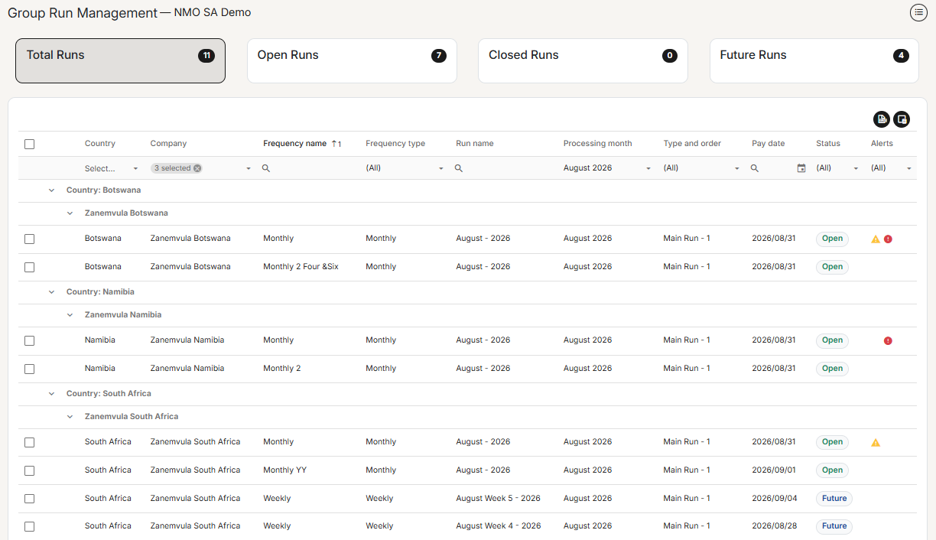
What you get:
- Instant visibility — Summary cards show your Total, Open, Closed, and Future runs at a glance, all filterable with one click
- Smart organization — Pay runs grouped by Country → Company → Pay Run, making it easy to locate what you need
- Error detection — An Alerts column flags runs with payroll errors and validation failures, with helpful tooltips so you catch problems before they cascade
- Bulk actions — Select multiple runs across companies and frequencies, then update their status all at once. Validation rules and permissions are fully respected throughout
- Built-in controls — Filter by Processing Month (Previous/Current/Next), export to Excel, and choose which columns you need
Permission-aware by design: The screen respects three levels of access control — whether you can see the screen at all, which companies and frequencies you can view, and which runs you can actually act on. Your existing security setup carries through seamlessly.
Go-live: Weekend of August 1–2, 2026 Who can use it: Bureau, Business Partner (normal and Agency top-level), and Company-level users (normal and super)
This is exactly what groups managing payroll at scale have been asking for — one place to monitor and close out runs, instead of repetitive company-by-company switching.
Pay Rate Setting Enhancement — Greater Control Over Payslip and Basic Pay Calculation
The pay rate settings have been enhanced to give you finer control over how payslips and Basic Pay calculate for different employee types. Previously, a single "Pay package automatically" setting controlled both payslip creation and Basic Pay calculation together — but there was no way to auto-create a payslip without also auto-calculating Basic Pay.
What's changed: The single setting has been split into two, giving you three flexible scenarios:
- Auto-create payslip + Calculate Basic Pay (default) — Payslips are created automatically each pay run with Basic Pay calculated. Ideal for salaried employees.
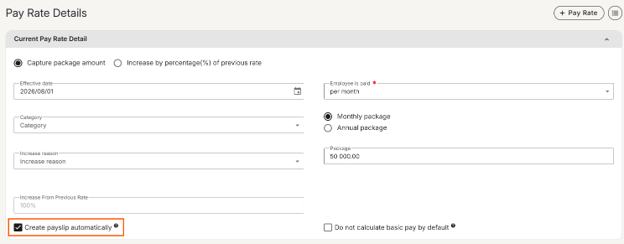
- Manual payslip creation — No automatic payslip or Basic Pay calculation. Ideal for hourly-paid employees whose pay comes from time & attendance systems.
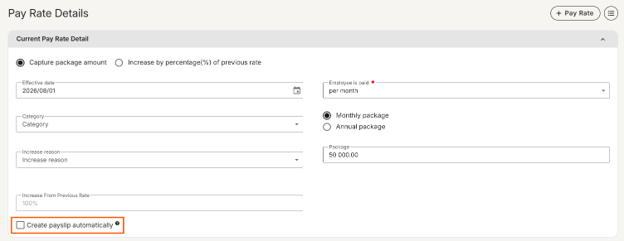
- Auto-create payslip + No Basic Pay calculation (new) — Payslips auto-create each pay run, but Basic Pay doesn't calculate. Only recurring components flagged to "Always calculate if there is a payslip regardless of basic pay being present" will calculate. Perfect for employees receiving statutory payments like Statutory Sick Pay or Statutory Maternity Pay — they need an auto-created payslip every period, but without a Basic Pay line item.

No Disruption: Existing customers are unaffected. Scenarios 1 and 2 work exactly as before; scenario 3 is opt-in only.
This gives you the flexibility to handle complex pay scenarios without manual intervention each pay run.
Flexible Loan Deductions with First Instalment Date Control
We're enhancing the Loan component with a new First Instalment Date field, giving you complete flexibility over when loan deductions begin. Whether you need to delay initial deductions for onboarding, seasonal considerations, or any other business reason, you can now set exactly when the first payment should be taken. This keeps your payroll aligned with your people's financial needs.
Keep an eye out on the release notes and next month's newsflash to see this live.
Employee Transfer Screen — Streamlined People Movement
Our screen conversion efforts continue with the new Employee Transfer screen. Designed with user feedback and modern interface standards, this screen makes it faster and easier to process employee transfers within your organization.
Employee Attachments in Pacey
Employees will soon be able to upload and download their personal documents directly within Pacey, without needing to navigate to the website . Instead of switching between platforms, your team can manage their attachments right where they chat, making it faster and easier to access and organize their files.
Product User Group Sessions - September 2026
We’re hosting the 2026 Product User groups sessions, an opportunity to contribute insights and for you to engage with our product experts. The next sessions are scheduled for September and we’d love for you to join:
Customer Sessions: Interactive, in-person sessions where you get to engage with our product experts directly. These sessions are only for Direct Customers.
Cape Town on-site: Friday, 11 September
Johannesburg on-site: Tuesday, 15 September
Business Partner Session: This session offers business partners a direct opportunity to interact and actively engage with our product experts, with the content adjusted to suit each partner's level of experience. This session is only for Business Partners. Registration link in the Business Partner Newsflash.
Business Partners: Friday, 18 September 11:00-12:00
Product Webinar: Offers all our direct customers who are outside the user group session areas a chance to get an in-depth view of the latest and upcoming features. This session is only for Direct Customers.
Product Webinar: Friday, 18 September 9:00-10:00
Support newsletter
Stay ahead of payroll changes. Our support team shares tips, best practices, and updates so you can confidently manage payroll in any market. Read now →
Training dates — 2026
| Course | Format | August dates | September dates | October dates |
|---|---|---|---|---|
| Payroll Administration Training | Half day | 03 | 01 | 01 |
| Payroll Essentials Training | Full day | 11172631 | 0207152128 | 02051319 |
| HR Essentials Training | Full day | 05 | 02 | 08 |
| Advanced Features Training | 2 full days | 06 & 0712 & 1318 & 1927 & 28 | 03 & 0409 & 1016 & 1722 & 2329 & 30 | 06 & 0714 & 1520 & 21 |
| RSA Payroll Tax Fundamentals Training | Full day | 07 | 04 | 08 |
| Payroll Tax Submission eLearning | Half day | eLearning | eLearning | eLearning |
| Employment Tax Incentive Training | 2 Half days | On request | On request | On request |
| Employment Equity Training | Half day | eLearning | eLearning | eLearning |
| Training Skills and Incident Management | Half day | 14 | 11 | 09 |
| Building a Demo Company Training - Business Partners | Full day | 04 | 18 | 08 |
| Java - Script and Income Training | 1.5 Days | On request | On request | On request |
| Seminars | ||||
| Payroll Tax Seminar | Half day | TBC | 15 | TBC |
| HR Seminar | Half day | TBC | TBC | TBC |
| Webinars | ||||
| Lunch and Learn | 1 hour | 13 | TBC | TBC |
All sessions are virtual. View the full training page →