
Payslip Visibility Control
Payroll teams face a timing constraint: close payroll early to streamline operations, but doing so immediately exposes payslips to employees, ahead of the intended pay date, or manually tick and untick the setting to hide payslips in a closed state each month. This forces a trade-off between operational efficiency and employee communication control. No way to separate payroll closure timing from payslip visibility without manual intervention. Approving and closing payroll automatically unlocks employee access to their payslips, with no automated option to delay visibility until the actual pay date.
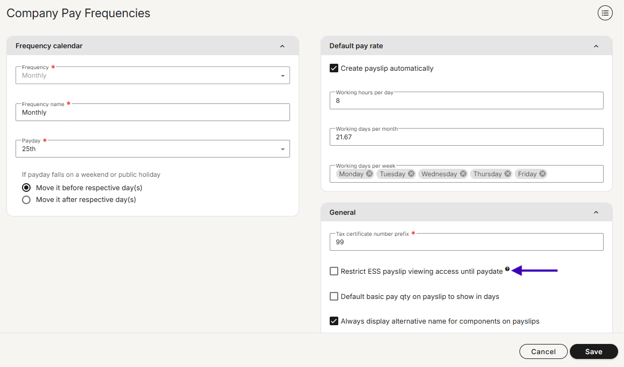
A new Payslip Visibility setting has been added to the frequency setup screen “restrict ESS payslip viewing access until paydate”
- Frequency-level check box - Set once per frequency; applies to all future runs
- Deferred visibility - Payroll can be closed at any time; employee access unlocks automatically on the PayDate
- Recurring by default - The setting persists across all subsequent runs under the same frequency
- Applies to ESS via the website and Pacey
Leave Calendar Visibility
Leave calendars now offer a third visibility option. You could already restrict viewing to your reporting hierarchy (manager/self/direct reports) or your full organization. Now add: restrict to employees in your organizational unit only. Perfect for departments that only need to see their own department/business unit’s leave, or for EOR partners running multiple companies as separate org units.
Who benefits: Multi-entity organizations, EOR partners, and departments where leave visibility maps to org structure, not just management hierarchy.

Leave Application - Add to Calendar
When leave requests move between approval stages, your managers and employees need to stay coordinated. Adding ICS calendar attachments to leave approval notifications puts the relevant dates directly into their calendar application.
What you get:
- Calendar-attached notifications - Leave approval notifications now include an ICS calendar file, so recipients can instantly add key dates (leave start/end) to their calendar without manual data entry.
- Sync-friendly - Works seamlessly with Outlook, Google Calendar, Apple Calendar, and other standards-compliant calendar applications.
- Fewer missed deadlines - Managers see leave approval windows and employee absence dates in their calendar workflow, reducing coordination friction.
Fewer missed approvals, better visibility, and less back-and-forth.
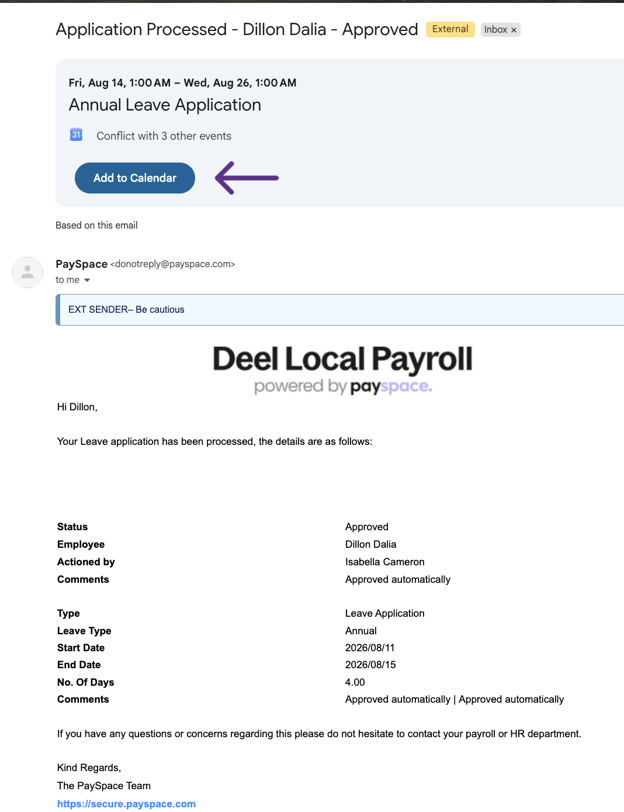
*Note that each email provider may have a different way of displaying the calendar attachment
Component - Level Editing Restrictions
Enforce data integrity at the source.
Security roles are getting granular. You'll soon control not just which screens users see, but which components they're allowed to edit. Say you have users dedicated to managing variable income, restrict them to only those components. Or if overtime flows from your time & attendance system as the source of truth, lock users out of editing it directly in payroll. Set rules once. The system enforces them across payslip edits, recurring screen, bulk uploads, and API calls with validation errors on save. Users can still see component values on any screen they have access to, they just can't input them. Moves you from training-based controls and month-end audits to system-enforced accuracy.
Why it matters: Less manual verification. Fewer month-end surprises. Data stays clean because users can't accidentally (or intentionally) modify it.
Leave Types - Control How Days Are Counted Per Leave Type
Annual leave is typically deducted in working days, while maternity leave often needs calendar day counting. Previously, you had to choose one approach for all leave types per employee, with no way to treat different leaves differently.
Now you will be able to configure each leave type independently. A new "Days to use during leave application" setting on every leave type gives you three options:
- Use company level setting (default) - Follows your standard working/calendar day pattern. No existing data changes required.
- Working days - This leave type always counts working days, regardless of company settings.
- Calendar days - This leave type always counts consecutive calendar days.
Why it matters: Manage your entire leave policy in one place without manual workarounds. Annual leave can follow working day patterns while other leave like maternity benefit can follow calendar day accuracy, all automatic per employee per leave type.
Recurring Cut-Off Date Settings
Cut-off dates are currently managed at individual run level, creating inconsistent timing rules across open runs and requiring manual input. By implementing a frequency-level setting that accepts 'X days before paydate,' users can establish consistent cut-off windows for all related runs with a single configuration, eliminating manual per-run management and ensuring standardized timing across the business per frequency.
Why It Matters
- Operational efficiency - Eliminates manual intervention and allows consistent cut off timing allowing users to start moving at their natural pace.
- Scalability - As global teams grow and add new pay structures, they can configure them without rewriting processes.
- Compliance confidence - Consistent, documented cut-off dates for each frequency make audit trails cleaner and compliance simpler.
AI Assist Knowledge Base
Did you know you can get immediate, on-demand support right inside your DLP platform?
If you haven't tried AI Assist, you're missing out on a faster way to resolve your daily payroll queries. Powered by our comprehensive knowledge base, AI Assist is designed to give you accurate answers instantly, without the need to log a support ticket or wait for an email reply.
How to get the best results:
AI Assist thrives on context. The more detail you include in your prompt, the better and more accurate your response will be.
We want your feedback
AI Assist is constantly learning, and your input is its best teacher. After receiving an answer, please use the 👍or 👎rating to let us know if it hit the mark, and drop a quick comment on the feedback given. Your insights are essential in helping us refine the tool and improve the support experience for everyone.
Try AI Assist now and simplify your support experience.
Product User Group Sessions - September 2026
We're hosting the 2026 Product User groups sessions this month, an opportunity to contribute insights and engage with our product experts. The on-site sessions planned for Johannesburg and Cape Town are fully booked, but there are still spaces available for the Product Webinar.
Product Webinar: If you weren't able to secure a spot at the on-site sessions, join us for an in-depth view of the latest and upcoming features. This session is only for Direct Customers.
Friday, 18 September 9:00-10:00
Training dates - 2026
| Course | Format | September dates | October dates | November dates |
|---|---|---|---|---|
| Payroll Administration Training | Half day | 01 | 01 | 02 |
| Payroll Essentials Training | Full day | 0207152128 | 0205131926 | 0309172330 |
| HR Essentials Training | Full day | 02 | 08 | 05 |
| Advanced Features Training | 2 full days | 03 & 0409 & 1016 & 1722 & 2329 & 30 | 06 & 0714 & 1520 & 2128 & 29 | 05 & 0610 & 1118 & 1924 & 25 |
| RSA Payroll Tax Fundamentals Training | Full day | 07 | 04 | 08 |
| Payroll Tax Submission eLearning | Half day | eLearning | eLearning | eLearning |
| Employment Tax Incentive Training | 2 Half days | On request | On request | On request |
| Employment Equity Training | Half day | eLearning | eLearning | eLearning |
| Training Skills and Incident Management | Half day | 11 | 09 | 06 |
| Building a Demo Company Training - Business Partners | Full day | 18 | 08 | 12 |
| Java - Script and Income Training | 1.5 Days | On request | On request | On request |
| Seminars | ||||
| Payroll Tax Seminar | Half day | 15 | TBC | TBC |
| HR Seminar | Half day | TBC | TBC | TBC |
| Webinars | ||||
| Lunch and Learn | 1 hour | 03 | TBC | TBC |
All sessions are virtual. View the full training page →
Enhanced Income Bases with Library Custom Forms & Dependent Custom Fields
Two updates give you more flexibility in how you calculate component income bases:
Library custom forms in component income bases: Previously, only history custom forms were available for income base calculations. Now you can use library custom forms too — giving you reusable custom form templates that drive your component calculations consistently across your setup.
Custom fields from employee dependants: Custom fields added to the Employee Dependants screen can now be picked up and used in your income base calculations. This opens up powerful scenarios: for example, you might need to calculate a funeral policy based on an employee's dependants. You already use dependants data for medical aid and tax credits — now add a custom field to indicate which dependants should be included in the funeral policy calculation, and base your funeral benefit calculation on that field.
One place, automated everywhere: Manage dependants and their attributes in one location, and let your income base calculations automatically pull that data. Less manual work, more accuracy, and your calculations stay synchronized with your people data.
This gives you the control to handle complex, employee-specific calculations without custom workarounds each pay run.
Group Run Management — Unified Pay Run Control Across Your Company Group
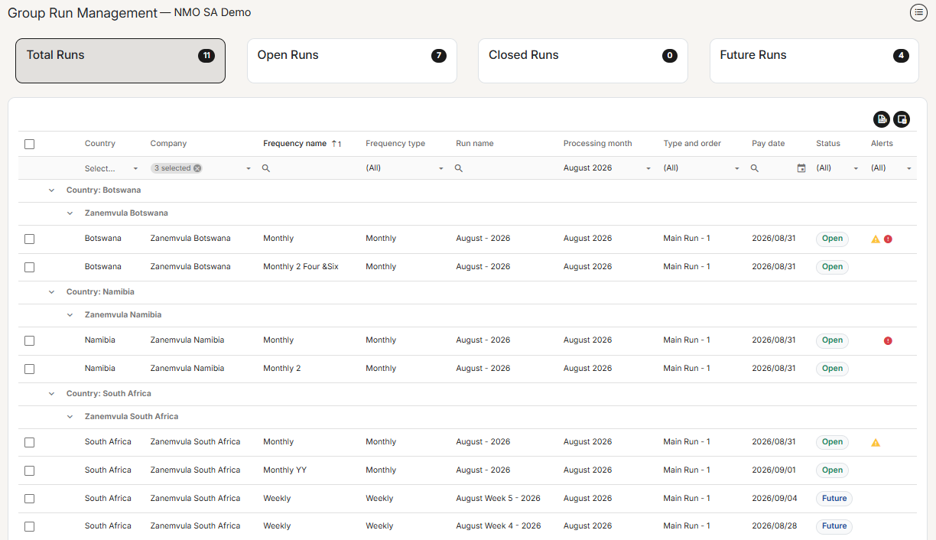
If you manage payroll across multiple companies, you've felt the friction: checking pay run status meant opening Company Run Management and switching between companies one by one. No more. Group Run Management consolidates everything into a single, organized view.
What you get:
- Instant visibility — Summary cards show your Total, Open, Closed, and Future runs at a glance, all filterable with one click
- Smart organization — Pay runs grouped by Country → Company → Pay Run, making it easy to locate what you need
- Error detection — An Alerts column flags runs with payroll errors and validation failures, with helpful tooltips so you catch problems before they cascade
- Bulk actions — Select multiple runs across companies and frequencies, then update their status all at once. Validation rules and permissions are fully respected throughout
- Built-in controls — Filter by Processing Month (Previous/Current/Next), export to Excel, and choose which columns you need
Permission-aware by design: The screen respects three levels of access control — whether you can see the screen at all, which companies and frequencies you can view, and which runs you can actually act on. Your existing security setup carries through seamlessly.
This is exactly what groups managing payroll at scale have been asking for — one place to monitor and close out runs, instead of repetitive company-by-company switching.
Pay Rate Setting Enhancement — Greater Control Over Payslip and Basic Pay Calculation
The pay rate settings have been enhanced to give you finer control over how payslips and Basic Pay calculate for different employee types. Previously, a single "Pay package automatically" setting controlled both payslip creation and Basic Pay calculation together — but there was no way to auto-create a payslip without also auto-calculating Basic Pay.
What's changed: The single setting has been split into two, giving you three flexible scenarios:
- Auto-create payslip + Calculate Basic Pay (default) — Payslips are created automatically each pay run with Basic Pay calculated. Ideal for salaried employees.
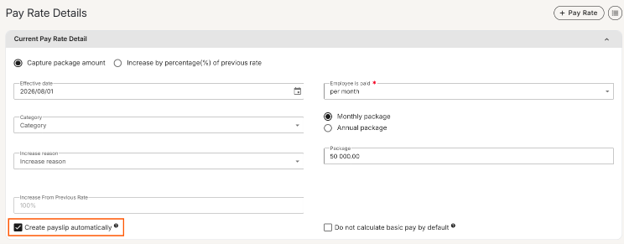
- Manual payslip creation — No automatic payslip or Basic Pay calculation. Ideal for hourly-paid employees whose pay comes from time & attendance systems.
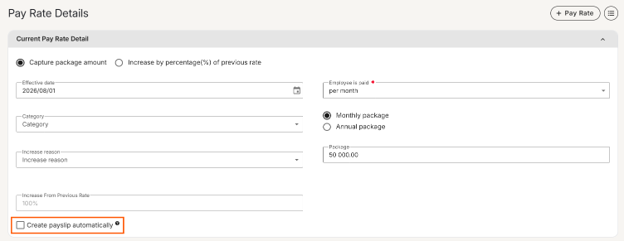
- Auto-create payslip + No Basic Pay calculation (new) — Payslips auto-create each pay run, but Basic Pay doesn't calculate. Only recurring components flagged to "Always calculate if there is a payslip regardless of basic pay being present" will calculate. Perfect for employees receiving statutory payments like Statutory Sick Pay or Statutory Maternity Pay — they need an auto-created payslip every period, but without a Basic Pay line item.
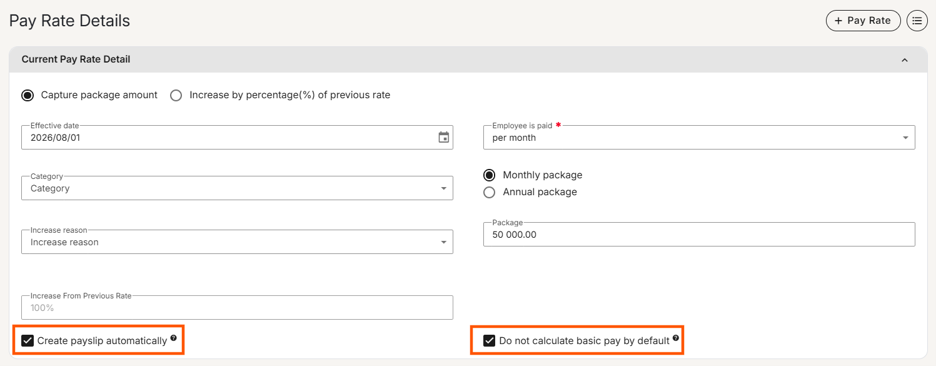
No Disruption: Existing customers are unaffected. Scenarios 1 and 2 work exactly as before; scenario 3 is opt-in only.
This gives you the flexibility to handle complex pay scenarios without manual intervention each pay run.
Flexible Loan Deductions with First Instalment Date Control
We're enhancing the Loan component with a new First Instalment Date field, giving you complete flexibility over when loan deductions begin. Whether you need to delay initial deductions for onboarding, seasonal considerations, or any other business reason, you can now set exactly when the first payment should be taken. This keeps your payroll aligned with your people's financial needs.
Keep an eye out on the release notes and next month's newsflash to see this live.
Employee Transfer Screen — Streamlined People Movement
Our screen conversion efforts continue with the new Employee Transfer screen. Designed with user feedback and modern interface standards, this screen makes it faster and easier to process employee transfers within your organization.
Employee Attachments in Pacey
Employees will soon be able to upload and download their personal documents directly within Pacey, without needing to navigate to the website . Instead of switching between platforms, your team can manage their attachments right where they chat, making it faster and easier to access and organize their files.
Product User Group Sessions - September 2026
We’re hosting the 2026 Product User groups sessions, an opportunity to contribute insights and for you to engage with our product experts. The next sessions are scheduled for September and we’d love for you to join:
Customer Sessions: Interactive, in-person sessions where you get to engage with our product experts directly. These sessions are only for Direct Customers.
Cape Town on-site: Friday, 11 September
Johannesburg on-site: Tuesday, 15 September
Business Partner Session: This session offers business partners a direct opportunity to interact and actively engage with our product experts, with the content adjusted to suit each partner's level of experience. This session is only for Business Partners. Registration link in the Business Partner newsletter.
Business Partners: Friday, 18 September 11:00-12:00
Product Webinar: Offers all our direct customers who are outside the user group session areas a chance to get an in-depth view of the latest and upcoming features. This session is only for Direct Customers.
Product Webinar: Friday, 18 September 9:00-10:00
Training dates — 2026
| Course | Format | August dates | September dates | October dates |
|---|---|---|---|---|
| Payroll Administration Training | Half day | 03 | 01 | 01 |
| Payroll Essentials Training | Full day | 11172631 | 0207152128 | 02051319 |
| HR Essentials Training | Full day | 05 | 02 | 08 |
| Advanced Features Training | 2 full days | 06 & 0712 & 1318 & 1927 & 28 | 03 & 0409 & 1016 & 1722 & 2329 & 30 | 06 & 0714 & 1520 & 21 |
| RSA Payroll Tax Fundamentals Training | Full day | 07 | 04 | 08 |
| Payroll Tax Submission eLearning | Half day | eLearning | eLearning | eLearning |
| Employment Tax Incentive Training | 2 Half days | On request | On request | On request |
| Employment Equity Training | Half day | eLearning | eLearning | eLearning |
| Training Skills and Incident Management | Half day | 14 | 11 | 09 |
| Building a Demo Company Training - Business Partners | Full day | 04 | 18 | 08 |
| Java - Script and Income Training | 1.5 Days | On request | On request | On request |
| Seminars | ||||
| Payroll Tax Seminar | Half day | TBC | 15 | TBC |
| HR Seminar | Half day | TBC | TBC | TBC |
| Webinars | ||||
| Lunch and Learn | 1 hour | 13 | TBC | TBC |
All sessions are virtual. View the full training page →
Smarter Custom Forms with helpful alerts
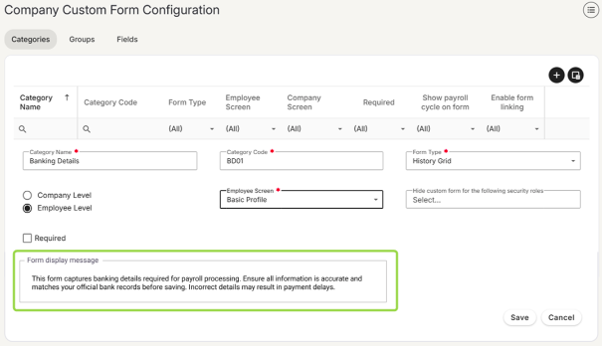
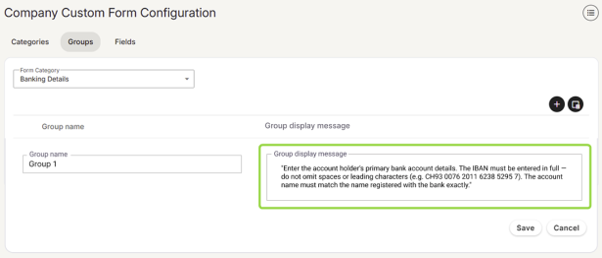
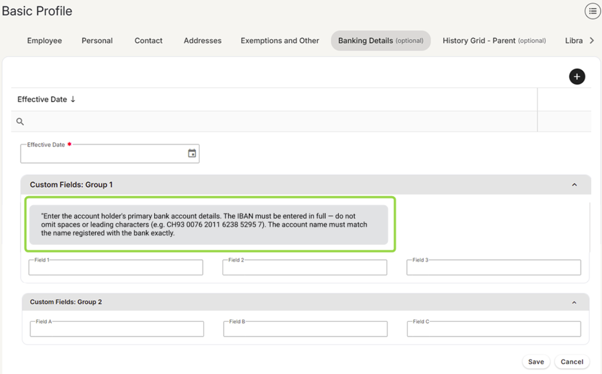
Guide your team through custom forms with precision. You can now add informational alert messages directly to forms or specific groups, ensuring context appears exactly where your team needs it. These helpful prompts can appear on the employee screen, the employee portal, or both, making form completion clearer and more intuitive than ever before.
Form display message — Categories tab
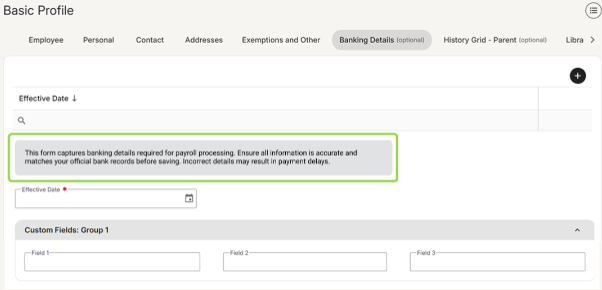
Group display message — Groups tab
Find any payroll component in seconds
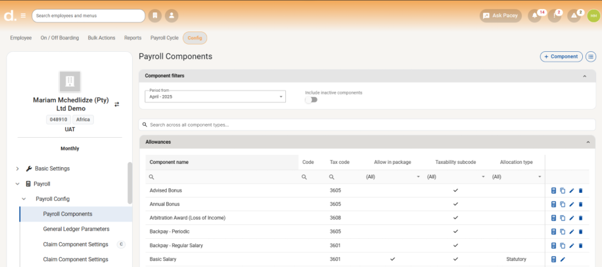
Say goodbye to tab-hopping. We've added a global search bar to the Payroll Components screen, so you can instantly find any component across all tabs with a single search. Whether you're managing a handful of components or hundreds, this upgrade saves time and puts the information you need right at your fingertips.
See all your pay runs at a glance — Group Pay Run View
The new Group Pay Run View consolidates payroll across all your companies and frequencies into a single screen. No more switching between views to track progress. You'll see every pay run at once, and close them in bulk when you're ready. For groups managing payroll at scale, this saves substantial time every cycle.
Keep an eye out on the release notes and next month’s newsflash to see this in action.
AI Assist — Web search for payroll and HR guidance
AI Assist will soon be enhanced with live web search capabilities, giving users instant access to current payroll, HR, and compliance information without leaving the chat. Whether an employee has a payslip question or an administrator needs to verify compliance rules, AI Assist will be able to retrieve up-to-date guidance from across the internet, making payroll faster and easier for your entire organisation.
What this will mean for you:
- Employees: Ask about payslip deductions, leave entitlements, tax implications, and more in plain language. Get context-rich explanations instantly, no more waiting for HR or searching through support articles.
- Administrators: Understand tax calculations, and resolve employee questions quickly. Reduce manual research time and improve confidence in your payroll decisions.
Real-world example:
South African payroll manager: Ask AI Assist: What are the latest tax rates for South Africa and AI Assist will retrieve current SARS tax bands, thresholds, and rebates in real time. No more chasing outdated spreadsheets or manually checking government websites.
AI Assist, soon in your pocket
AI Assist is going mobile. We're optimising the AI Assist experience for mobile devices, so employees can enjoy a seamless, beautifully formatted chat experience no matter where they are or what device they're using. On top of that, employees using Pacey on WhatsApp will soon find AI Assist available directly as a menu option, making it even easier to get instant, intelligent support right from their favourite messaging app.
Pacey AI is now AI Assist
You'll notice 'Pacey AI' is now 'AI Assist' in your navigation bar. Same powerful payroll and HR guidance, clearer name, because it's the intelligent assistant you turn to for instant answers, not a chatbot.
Nothing changes in terms of how you access or use it. Simply look for the AI Assist icon in your navigation bar to get started.
Additionally, we want to highlight that AI Assist is a distinct feature from Pacey, our existing WhatsApp-based ESS module. Both are separate products that serve different purposes:
- Pacey (WhatsApp ESS)
What it is: WhatsApp based ESS module > Who it's for: Employees via WhatsApp > Cost: Paid add-on
- AI Assist
What it is: In system AI chat assistance > Who it's for: Admins, payroll professionals and employees > Cost: Included at no additional cost
Reminder: Have you activated AI Assist?
If you haven't yet activated AI Assist, you can do so by following these simple steps:
- Navigate to Config > Basic Company Information
- Select the General tab
- Check the box: "Enable AI Assist and accept the Terms and Conditions"
- Save your changes
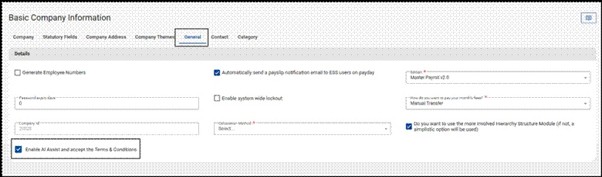
Once activated, all users, including Business Partner, Company-Level, and ESS users, will have immediate access to AI Assist via the navigation bar. If you need to restrict access for specific users, this can be managed through their assigned security role.
✅ Available on all payroll editions
✅ No additional licensing or cost required
What can AI Assist do for you?
AI Assist is available with three features:
Query my Payroll Component Setup
Ever found yourself spending hours cross-referencing payroll components, only to end up with more questions than answers? AI Assist cuts through the complexity. Type your question the same way you'd ask a colleague, and get a straight answer, no reports to run, no screens to dig through.
Best for: Payroll managers, administrators, business partners.
Try asking things like:
- "What is the formula used for the night shift allowance?"
- "Which components are set to calculate on a pro-rata basis?"
Talk to me about my Payslip
How much time does your team spend fielding the same payslip questions from employees every month? AI Assist handles those conversations for you. Employees get immediate, jargon-free answers to their payslip queries without needing to contact HR or payroll, freeing your team up for the work that actually needs their expertise.
Best for: Employees, payroll managers and administrators.
Try asking things like:
- "Can you explain the difference between my tax this month and last month?"
- "What is the SDL contribution on my payslip and who pays it?"
Knowledge Base Search
Get instant access to support content and system guidance without ever leaving the chat. Open AI Assist, select "Get intelligent answers from our knowledge base", and AI Assist retrieves relevant articles in real time, with full follow-up question support.
Try asking things like:
- "How do I set up a new position?"
- "Where do I configure a new medical aid scheme?"
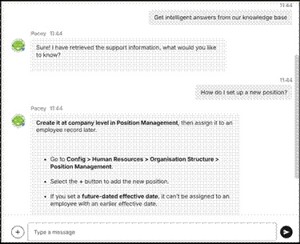
⚠️ Please note: The Knowledge Base Search feature is not available to ESS users.
Your feedback is essential
AI Assist is a product we're continuously evolving, and your input is what shapes it. If you've used the feature, please take a moment to rate AI Assist's responses, every thumbs up or thumbs down helps us improve accuracy and relevance for your team.
We'd love to know what's working well, what could be better, and what you'd love to see AI Assist do next.
Please send feedback to product@payspace.com
Training dates — 2026
| Course | Format | July dates | August dates | September dates |
|---|---|---|---|---|
| Payroll Administration Training | Half day | 01 | 03 | 01 |
| Payroll Essentials Training | Full day | 06152127 | 0411172631 | 0207152129 |
| HR Essentials Training | Full day | 03 | 05 | 02 |
| Advanced Features Training | 2 full days | 07 & 0816 & 1722 & 2328 & 29 | 06 & 0712 & 1318 & 1927 & 28 | 03 & 0409 & 1016 & 1722 & 2329 & 30 |
| RSA Payroll Tax Fundamentals Training | Full day | 06 | 07 | 04 |
| Payroll Tax Submission eLearning | Half day | eLearning | eLearning | eLearning |
| Employment Tax Incentive Training | 2 Half days | On request | On request | On request |
| Employment Equity Training | Half day | eLearning | eLearning | eLearning |
| Training Skills and Incident Management | Half day | 10 | 14 | 11 |
| Building a Demo Company Training - Business Partners | Full day | 02 | 04 | 04 |
| Java - Script and Income Training | 1.5 Days | On request | On request | On request |
| Seminars | ||||
| Payroll Tax Seminar | Half day | 28 | TBC | TBC |
| HR Seminar | Half day | TBC | TBC | TBC |
| Webinars | ||||
| Lunch and Learn | 1 hour | 14 | TBC | TBC |
All sessions are virtual. View the full training page →
Product podcast — June
Stay informed while multitasking with our AI-generated podcast version of the monthly product update. A quick, easy way to catch every new feature and enhancement wherever you are.
E-Onboarding enhancements
Following strong adoption of E-Onboarding and your valuable feedback, we've released two new enhancements to further streamline the onboarding experience.
Attachment functionality New hires can now upload documents — such as copies of IDs, proof of bank details, and certificates — directly within their E-Onboarding forms during the process. No more back-and-forth to collect supporting documents after the fact.
Export for completed hires A new extract feature makes it easy to track and monitor all new engagements processed through E-Onboarding — giving administrators a clear, consolidated view for reporting and reconciliation.
Ask Pacey — Knowledge Base search is live
A reminder that Ask Pacey AI's Knowledge Base search is now available. You can find support content and system guidance without ever leaving the chat — simply open Ask Pacey AI from the main navigation bar and select "I want to search the knowledge base". Pacey retrieves relevant articles in real time and you can keep asking follow-up questions to get the context you need.
Please note: This feature is not available to Employee Self-Service (ESS) users.
Your feedback continues to shape how Pacey improves. If you've used the feature, please take a moment to rate Pacey's responses — every thumbs up or thumbs down helps us improve accuracy and relevance for your team.
Screen conversion — Disability Lump Sum Setup
The Disability Lump Sum Setup screen is being converted to NextGen, bringing a cleaner, more consistent experience to the configuration of disability lump sum payment rules.
Navigation: Config > Payroll > Tax > Disability Lump Sum Setup
Key changes coming with this conversion:
- Enhanced grid layout — Search and filter functionality on each column, with in-row editing for faster configuration updates.
- Slide-out panel — Records can be added and edited via a structured slide-out panel, replacing the previous form-based approach.
- No change to functionality — All existing disability lump sum calculation rules and tax treatment behaviour are preserved. This is a UI conversion only.
Screen conversion — Medical Aid Setup
The Medical Aid Setup screen is also being converted to NextGen, bringing it in line with the modern Deel Local Payroll interface.
**Navigation: **Config > Payroll > Medical Aid > Medical Aid Setup
Key changes coming with this conversion:
- Enhanced grid layout — Search and filter on each column, with in-row editing for faster updates to existing schemes.
- Grouped view — The grid is organised per medical aid, so you can clearly see which schemes belong to which fund and search for either at a glance.
- Slide-out panel — Records can be added and edited via a structured slide-out panel, replacing the previous form-based approach.
- No change to functionality — All existing medical aid setup rules and calculation behaviour are preserved. This is a UI conversion only.
New component setting — "Do not calculate on interim run"
If you've ever needed a recurring payroll component to skip calculation during an interim run, you'll know this currently requires JavaScript-based workarounds that can be complex to set up and difficult to maintain over time.
We're introducing a simpler solution. A new "Do not calculate on interim run" flag is being added to the Company Payroll Components screen. Once enabled on a component, the system will automatically suppress that component's recurring calculation whenever an interim payroll run is processed — even if basic pay is present or the "Calculate Regardless of Basic Pay" setting is active.
It's worth noting that any once-off amounts entered manually on an interim payslip will still be processed and posted as normal. The suppression only applies to the system-driven recurring calculation.
This change eliminates the need for complex custom scripts and makes interim run behaviour straightforward to configure and audit.
Shape Deel Local Payroll's AI roadmap — join us on 11 June
We're building AI features across hiring, payroll, HR, and compliance — and we want your input before we decide what to prioritise.
Join us for a live virtual session on Thursday, 11 June at 10:00 AM SAST, where we'll walk you through a set of AI concept explorations. Some are early-stage ideas. Some are close to ready. All are designed to save your team time and reduce manual work where it matters most.
What to expect:
- Live walkthrough of AI concepts across hiring, payroll, HR, and compliance
- Open discussion and real-time Q&A
- A short survey to capture your priorities and feedback
- Early visibility into Deel's AI roadmap
Your feedback directly shapes which ideas move forward — so your time carries real weight here. Come ready to engage, and don't hold back the critical takes. We learn just as much from what doesn't fit your workflow as from what does.
Questions before signing up? Reach out to the Product team at product@payspace.com
The Deel Local Payroll Product Team
Training dates — Q2/Q3 2026
| Course | Format | June dates | July dates | August dates |
|---|---|---|---|---|
| Payroll Administration Training | Half day | 04 | 01 | 03 |
| Payroll Essentials Training | Full day | 02081726 | 0206152127 | 0411172631 |
| HR Essentials Training | Full day | 02 | 03 | 05 |
| Advanced Features Training | 2 full days | 03 & 0409 & 1029 & 30 | 03 & 0409 & 1029 & 30 07 & 0816 & 1822 & 2328 & 29 | 06 & 0712 & 1318 & 1927 & 28 |
| RSA Payroll Tax Fundamentals Training | Full day | 22 | 06 | 07 |
| Payroll Tax Submission eLearning | Half day | eLearning | eLearning | eLearning |
| Employment Tax Incentive Training | 2 Half days | On request | On request | On request |
| Employment Equity Training | Half day | eLearning | eLearning | eLearning |
| Eswatini Country Specific Training | Half day | eLearning | eLearning | eLearning |
| Building a Demo Company Training - Business Partners | Full day | 12 | 02 | 04 |
| Java - Script and Income Training | 1.5 Days | On request | On request | On request |
| Seminars | ||||
| Payroll Tax Seminar | Half day | TBC | TBC | TBC |
| HR Seminar | Half day | TBC | TBC | TBC |
| Webinars | ||||
| Lunch and Learn | 1 hour | 11 | TBC | TBC |
All sessions are virtual. View the full training page →
Product podcast — May
Stay informed while multitasking with our AI-generated podcast version of the monthly product update. A quick, easy way to catch every new feature and enhancement wherever you are.
Listen to the latest update — podcast series →
Screen conversion — Rating Scales
The Scale Definitions and Scale Options screens have been converted to NextGen and combined into a single screen: Rating Scales.
Navigation: Config > Human Resources > Performance Management > Rating Scales
- Combined screen — Scale Definitions and Scale Options consolidated into a single Rating Scales screen, giving a clearer view of all scale names and option values in one place.
- Enhanced grid layout — scale names and associated options shown in a hierarchical grid with search and filter on each column. Records can be added and edited via slide-out panels.
- Expandable rows — scale name rows can be expanded and collapsed to reveal their associated option values.
The same security rules from the Scale Options Classic screen apply. Available on Premier and Master editions only.
Screen conversion — Performance processes
Evaluation process types and evaluation processes have been combined into a single screen: Performance cycle setup.
Navigation: Config > Human Resources > Performance Management > Performance cycle setup
- Quick access to changing the status of a cycle (similar to the run management screen).
- A clean slide-out menu with sections for Cycle Details and Additional Settings.
- APIs are available and will be exposed shortly, allowing customers to create and manage performance cycles through integration.
A fresh new look for Deel Local Payroll
Our updated look and feel launches this weekend, 10 May. As part of our ongoing alignment with the Deel brand, we've refreshed the Deel Local Payroll system with a more modern interface — closer to what you'd expect from the broader Deel platform.
- Direct customer skin — you'll now see a purple theme colour.
- All customers, including white-labelled — expect small UI refinements such as rounded corners and a new font style.
All changes are cosmetic only and have no impact on functionality.
Ask Pacey — Knowledge Base search
Ask Pacey AI is being enhanced to give you instant access to Knowledge Base articles, so you'll be able to find support content and system guidance directly within the chat.
Once available, open Ask Pacey AI, select "I want to search the knowledge base", and Pacey will retrieve relevant support information and respond within the chat window — just like a conversation. Follow-up questions are supported, with contextual answers pulled from the Knowledge Base in real time.
This feature will not be available to Employee Self-Service (ESS) users.
AI Assist
In case you missed it last month, AI Assist is our built-in AI chatbot designed to make payroll information faster and easier to access — right inside the system you use every day. Available now.
Query my Payroll Component Setup — ask AI Assist questions about your company's payroll configuration and get immediate, conversational answers. Validate setup information on demand, reduce manual checks, and spend less time extracting data.
Best for: payroll managers, administrators, business partners. Try asking: "Show me all active deduction components for this company.", "Is the travel allowance component set up as taxable or non-taxable?", "Which components are linked to the basic salary package?"
Talk to me about my Payslip — employees and administrators can ask payslip questions in a simple chat format. AI Assist draws on payroll data, legislative knowledge, and reference material to give clear, context-rich explanations any time, day or night.
Best for: employees, payroll managers and administrators. Try asking: "Why is my net pay different this month?", "What does the UIF deduction on my payslip mean?", "Why was PAYE higher on my last payslip?"
Send feedback to product@payspace.com. For more, visit the Knowledge Base → or the AI Assist webpage →.
Training dates — Q2/Q3 2026
| Course | Format | May dates | June dates | July dates |
|---|---|---|---|---|
| Payroll Administration Training | Half day | 4 | 1 | 1 |
| Payroll Essentials Training | Full day | 5112029 | 181726 | 6152127 |
| HR Essentials Training | Full day | 7 | 2 | 3 |
| Advanced Features Training | 2 days | 7–812–1321–2226–27 | 3–49–1029–30 | 7–816–1722–2328–29 |
| RSA Payroll Tax Fundamentals | Full day | 8 | 5 | 9 |
| Payroll Tax Submission | Half day | eLearning | ||
| Employment Tax Incentive | 2 half days | On request | ||
| Employment Equity | Half day | eLearning | ||
| Eswatini Country Specific | Half day | eLearning | ||
| Building a Demo Company — Business Partners | Full day | 15 | 12 | 2 |
| Java — Script and Income | 1.5 days | On request | ||
| Tax Seminar | Half day | TBC | TBC | TBC |
| HR Seminar | Half day | 28 | TBC | TBC |
| Lunch and Learn Webinar | 1 hour | 14 | TBC | TBC |
All sessions are virtual. View the full training page →
Product podcast — April
Stay informed while multitasking with our AI-generated podcast version of the monthly product update. A quick, easy way to catch every new feature and enhancement wherever you are.
Listen to the latest update — podcast series →
Ask Pacey — AI Assist is officially here
AI Assist is our new Deel Local Payroll assistant, designed to help your team and employees navigate complex payroll data and questions using simple, natural-language chat.
The initial launch includes two features:
Query my Payroll Component Setup — allows administrators to get immediate, conversational answers to questions about a company's payroll configuration. Streamlines payroll analysis, reduces manual checks, and makes it easier to validate setup information on demand.
- Efficiency — instant access to payroll setup details without running separate reports.
- Accuracy & Compliance — quickly validate configuration settings.
- Focus on Value — free up time for more strategic activities.
Talk to me about my Payslip — enables employees and administrators to ask payslip questions in a simple chat format. Pacey combines payroll data, legislative knowledge, and reference material for clear, context-rich explanations.
- 24/7 Support — employees get immediate answers to payroll and payslip questions at any time.
- Clarity — complex payroll concepts explained in a clear, easy-to-understand manner.
- Efficiency — reduces HR workload by automating responses to repetitive queries.
- Accuracy — consistent, accurate guidance for employee payslip questions.
Activating AI Assist — included on all product editions at no additional cost. Go to Basic Company Information, accept the Terms and Conditions, and the feature will be accessible to all users including ESS access.
We strongly encourage you to share your feedback on AI Assist's responses — continuous improvement relies on your input.
For more information visit the Knowledge Base → or the AI Assist webpage →
Screen Conversion — Company Documents
The Company Documents screen has been converted to NextGen with a refreshed interface and enhanced security controls. All uploaded files now undergo security checks — any detected risk blocks the upload, protecting your data and ensuring safer document management.
Screen Conversion — Rater Setup
The Rater Setup screen has been successfully converted to NextGen. Key changes include:
- Classic Employee KPA's Tab Retention — the Employee KPA's tab remains available in Classic temporarily while a separate NextGen conversion is completed.
- Visual Weighting Bar — a percentage bar showing allocated rater weightings that updates automatically as raters are added.
- Rater Count Badges — each process type now shows the number of linked raters.
- Rater Type field — only one rater per Process Type and Default Template combination for Direct Report, Manager or Self. Selecting "Self" auto-assigns the employee.
- Inherit Rater from Position — when "Manager" or "Direct Report" is selected, the system auto-assigns direct reports from the employee's Position screen.
Custom Fields — Position Management
Administrators can now create and maintain their own Custom Fields on the company's Position Management screen, enabling alignment with specific operational or reporting requirements.
E-Onboarding next-level enhancements
Based on your feedback, several key enhancements are in development:
- Attachment Functionality — new hires will be able to upload documents (IDs, proof of bank details, SARS documents) directly within the E-Onboarding forms.
- Multiple Approver Notifications — notify additional recipients or multiple designated approvers when a form is submitted.
- Export for Completed Hires — a new extract feature for easy tracking of all New Engagements processed through E-Onboarding.
Leave — Calculate leave for employees without a payslip
Leave balances will soon be calculated and displayed for active employees, even in payroll runs where no payslip exists. The system will automatically flag the employee and populate the Leave Balance screen within the Main Run for that period.
Deel Local Payroll — Product Webinar
We hosted a virtual webinar in March offering an exclusive first look at future enhancements and new product features. If you missed it, catch the recap on YouTube →
Retro Pay
Deel Local Payroll offers retro functionality to process backdated pay rate changes automatically — ideal for late approvals on promotions, increases, or union negotiations. The system calculates the difference and reflects the adjustment on a retrospective payslip, with a detailed breakdown for each affected pay component.
Refer to the Knowledge Base → for guidance on how to process Retro Pay.
Customer Support Talk Newsletter
The latest news, tips, and tricks from the customer support team — published monthly. Read now →
Training dates — Q2/Q3 2026
| Course | Format | April dates | May dates | June dates |
|---|---|---|---|---|
| Payroll Administration Training | Half day | 1 | 4 | 1 |
| Payroll Essentials Training | Full day | 132228 | 5112028 | 181726 |
| HR Essentials Training | Full day | 2 | 7 | 2 |
| Advanced Features Training | 2 days | 14–1523–2429–30 | 7–812–1321–2226–27 | 3–49–1029–30 |
| RSA Payroll Tax Fundamentals | Full day | 14 | 8 | 5 |
| Payroll Tax Submission | Half day | eLearning | ||
| Employment Tax Incentive | 2 half days | On request | ||
| Employment Equity | Half day | eLearning | ||
| Eswatini Country Specific | Half day | eLearning | ||
| Building a Demo Company — Business Partners | Full day | 10 | 15 | 12 |
| Java — Script and Income | 1.5 days | On request | ||
| Tax Seminar | Half day | 19 | TBC | TBC |
| HR Seminar | Half day | TBC | TBC | TBC |
| Lunch and Learn Webinar | 1 hour | 23 | TBC | TBC |
All sessions are virtual. View the full training page →
Product podcast — March
Stay informed while multitasking with our AI-generated podcast version of the monthly product update. A quick, easy way to catch every new feature and enhancement wherever you are.
Listen to the latest update — podcast series →
Screen conversion: Period Processes and Payroll Processes Definition
The Period Processes and Payroll Processes Definition screens have been converted to NextGen. Both screens are now consolidated into a single Payroll Cycle Setup screen, organised into two tabs.
Cycle Stages (previously "Period Processes") — use this tab to capture and manage payroll cycle stages. Key changes include:
- In-row editing — the grid now supports in-row editing with search and filter functionality for every column.
- Inactive date column — mark stages as inactive; they will no longer appear in Cloudroom checklist items or the Payroll Process Tracker.
- Frequency column — assign cycle stages to specific frequencies.
Cycle Setup (previously "Payroll Processes Definition") — use this tab to define processes and link them to stages. Key enhancements include:
- Reorder Cycle Setups — drag-and-drop reordering. Dragging one setup onto another creates a parent–child hierarchy.
- Streamlined configuration — new slide-out menu for faster capture and management.
- Rule-based due dates — the most significant update to the payroll cycle. Set deadlines relative to pay date — for example, payroll sign-off due 5 working days before pay date, with a specific cut-off time.
Bulk actions: Cycle Stages and Cycle Setup
Two new bulk actions allow upload of Cycle Stages and Cycle Setups in bulk.
- Cycle Stages — Bulk Actions > Company > Payroll Cycle > Cycle Stages
- Cycle Setup — Bulk Actions > Company > Payroll Cycle > Cycle Setup
Introducing the Payroll Process Tracker dashboard
The new Payroll Process Tracker is your command centre for managing and prioritising payroll tasks across all authorised companies and pay frequencies. Access it under Payroll Cycle > Payroll Tracker Dashboard.
- Interactive status cards — view counts for overdue, due today, and upcoming tasks. Selecting a card auto-filters the grid.
- In-row editing — specify completion dates directly in the grid.
- Customisable grid — column chooser lets you tailor the view or export data for reporting.
- Stage ownership — the owner column indicates Client (C) or Vendor (V) responsibility.
- Security and permissions — super users manage access via the new "Payroll Process Tracker" securable object under the Payroll Cycle menu branch.
Available on all product editions.
Separate cut-off dates for claims and leave
An enhancement is in development for the run management screen to support separate cut-off dates for claims and leave. The existing single cut-off date will be replaced with two distinct fields, allowing independent management per your organisation's policies.
User interface enhancements: future-dated terminations and suspensions
Upcoming UI improvements will surface employee status more clearly across the system:
- Terminated — red border around the employee photo.
- Future-dated terminations — employees remain visible as active until their termination date; upcoming termination details display in grey on their profile.
- Suspended — yellow border, with suspension details prominently displayed for the current period.
Advanced Employee Search will also be enhanced to reflect each employee's current status directly within search results.
Product Webinar — March 2026
An exclusive virtual session for direct customers covering the latest and upcoming features of 2026. Thursday, 12 March.
Knowledge base and FAQs: payroll made easy
Access the Knowledge Base
Navigate to PaySpace Wisdom by clicking your initials and selecting "How can we help?" — then select your region or search for any topic directly.
Customer Support Talk Newsletter
The latest news, tips, and tricks from the customer support team — published monthly. Read now →
Training dates — Q2 2026
| Course | Format | March dates | April dates | May dates |
|---|---|---|---|---|
| Payroll Administration Training | Half day | 3691627 | 27132228 | 5112028 |
| Payroll Essentials Training | Full day | 3691627 | 27132228 | 5112028 |
All sessions are virtual. View the full training page →
Welcome to 2026
We wish all our valued customers and partners a Happy New Year and a prosperous 2026. We look forward to an even greater year ahead, driving innovation and achieving new milestones together.
Product Podcast — February
Catch the February newsletter in an easy, on-the-go podcast format.
Listen to the podcast series →
E-Onboarding goes continental
Following successful adoption in South Africa, E-Onboarding is now available in 30+ countries across Africa — including Angola, Botswana, Ghana, Kenya, Nigeria, Uganda, Zimbabwe, and more.
- Lite Edition — access to the default template configured for your country.
- Premier & Master Edition — activate and customise your own E-Onboarding form to match your onboarding process.
Don't see your country? Contact product@payspace.com to request a country form.
Screen conversion — Leave Averaging Income Setup
The Leave Averaging Income Setup screen has been converted to NextGen. Key changes include:
- API endpoints — added to support integrations and automation.
- Collapsible sections — Allowances section expanded by default; other sections collapsible for cleaner organisation.
- Grid layout — standard search and filter in each column, with in-row editing.
Screen conversion — Leave Scheme Parameters
The Leave Scheme Parameters screen is now available following extensive fine-tuning. For details, refer to the October 2025 newsletter and the system's release notes.
Run Management — Column Chooser
The Column Chooser has been introduced to both Company and Bureau Run Management screens. A new Claims and leave application cut-off date column is now available — view all run cut-off dates directly on the grid without opening individual runs.
Phase 1: Employee Templates
Employee Templates is a new feature for setting up structured payroll configurations for defined employee groups, based on contract, pay structures, and payroll variations.
Phase 1 focuses on Component Variables, allowing standardised variable amounts across employee groups for consistency and less manual intervention. Future phases will extend to Leave, Recurring Payroll Components, and other contract configurations.
Three related screens are introduced:
- Company Template Setup — Config > Basic Settings > General Company > Template Setup
- Company Template Configuration — Config > Basic Settings > General Company > Template Configuration
- Employee Templates — Basic Information > Employee Templates
Available on all product editions.
Bulk actions — Employee Templates
A new bulk action allows you to link all employees to Template Configurations at company level. Find it under Bulk Actions > Employee > Basic Information > Employee Templates.
New Income Base — Component Variables
A Component Variables source type has been added to income bases, allowing Template and Sub-template Component Variables to be referenced in calculations automatically — eliminating manual updates when values change.
Payroll Tracker Dashboard
A Payroll Tracker Dashboard is in development — a central command centre to help payroll teams identify which tasks are overdue, due today, or upcoming across multiple companies. Now released in March 2026 — see March update above.
Product User Group Sessions — March 2026
- Johannesburg — Friday, 6 March (direct customers)
- Cape Town — Tuesday, 10 March (direct customers)
- Business Partners — Thursday, 12 March
- Product Webinar — Thursday, 12 March (direct customers outside session areas)
Automate run closure before pay date
Close runs automatically
Set the system to close payroll runs a defined number of days before the scheduled pay date. Configure in Config > Basic Settings > Company Settings > General Settings > Payroll Settings.
Training dates — Q1 2026
See the training page for the full schedule of virtual sessions for Q1 and Q2 2026.
January 2026 Update
See this month's release notes and Knowledge Base for the full feature summary.
Product Podcast — December
Listen now →
Training Courses screen
See release notes for full conversion details.
Rater setup
See release notes for full details.
Custom fields — leave
See release notes for full details.
Bulk actions — Employee KPI
See release notes for full details.
Product survey
Your feedback shapes the roadmap. See the survey link in your email.
December feature spotlight
See Knowledge Base for detailed guides on this month's highlighted feature.
December message
Thank you for another year. See December's full release notes for details.
System security update
See release notes for details on this month's security enhancements.
Product Podcast — November
Listen now →
Parental leave
See release notes for full details.
NextGen screen conversions
See release notes for full details.
Run management
See release notes for full details.
Coming soon — November
Upcoming features previewed this month. See release notes for details.
November feature spotlight
See Knowledge Base for detailed guides.
User group sessions
See calendar invites for session details.
Product Podcast — October
Listen now →
Payroll component screen conversion
See release notes for full details.
General Ledger parameters
See release notes for full details.
Leave scheme parameters
See release notes for full details.
Claims component
See release notes for full details.
Run management
See release notes for full details.
Employee leave setup
See release notes for full details.
October feature spotlight
See Knowledge Base for detailed guides.
User group sessions
See calendar invites for session details.
Product Podcast — September
Listen now →
E-Onboarding
See release notes for full details.
E-Onboarding bulk upload
See release notes for full details.
Dynamic form builder
See release notes for full details.
Training courses
See release notes for full details.
September feature spotlight
See Knowledge Base for detailed guides.
User group sessions
See calendar invites for session details.
Product Podcast — August
Listen now →
Position management
See release notes for full details.
Recurring cost
See release notes for full details.
Rater setup
See release notes for full details.
Claims
See release notes for full details.
Leave bucket mapping
See release notes for full details.
August feature spotlight
See Knowledge Base for detailed guides.
Product Podcast — July
Listen now →
Performance management
See release notes for full details.
Roster
See release notes for full details.
New shift type
See release notes for full details.
Company roster
See release notes for full details.
Onboarding
See release notes for full details.
Payroll component
See release notes for full details.
July feature spotlight
See Knowledge Base for detailed guides.
Product Podcast — June
Listen now →
Leave settings
See release notes for full details.
Pacey AI update
See release notes for full details.
Run management
See release notes for full details.
Screen conversion
See release notes for full details.
Bulk actions
See release notes for full details.
June feature spotlight
See Knowledge Base for detailed guides.
Product Podcast — May
Listen now →
Leave scheme setup
See release notes for full details.
Pacey AI update
See release notes for full details.
Run management
See release notes for full details.
Custom fields
See release notes for full details.
Other dropdowns
See release notes for full details.
May feature spotlight
See Knowledge Base for detailed guides.
Payslip pay date
See release notes for full details.
Proration
See release notes for full details.
Calculation settings
See release notes for full details.
Grid display
See release notes for full details.
Public holidays bulk action
See release notes for full details.
Company roster
See release notes for full details.
Dynamic form builder
See release notes for full details.
April webinar
See calendar invite for details.
Dynamic form builder
See release notes for full details.
Bulk upload
See release notes for full details.
Tax ESS
See release notes for full details.
Leave
See release notes for full details.
Pay day
See release notes for full details.
Stats SA
See release notes for full details.
Leave setup
See release notes for full details.
Training courses
See release notes for full details.
Screen conversion
See release notes for full details.
Security settings
See release notes for full details.
Employee termination
See release notes for full details.
New company setup
See release notes for full details.
Grid enhancements
See release notes for full details.
Pay dates
See release notes for full details.
Calculation settings
See release notes for full details.
User groups
See release notes for full details.
February message
See release notes for full details.
Screen conversion
See release notes.
Copy payroll
See release notes.
Pacey AI update
See release notes.
Tax years
See release notes.
Leave balances
See release notes.
Bulk actions
See release notes.
Bulk uploads
See release notes.
New payroll
See release notes.
Payslip message
See release notes.
Product reminder
See release notes.
December 2024 message
See release notes.
Screen conversion — grades
See release notes.
Bulk actions — grades
See release notes.
Leave calendar
See release notes.
Security screens
See release notes.
Leave balances
See release notes.
Bank names
See release notes.
Tooltips
See release notes.
Screen conversion
See release notes.
Recurring template
See release notes.
Custom form
See release notes.
Dynamic form builder
See release notes.
Company themes
See release notes.
Bulk actions
See release notes.
Pacey AI — language support
See release notes.
Custom fields
See release notes.
Bank names
See release notes.
Cloud room
See release notes.
GP community
See release notes.
Screen conversion
See release notes.
Pacey AI update
See release notes.
New custom field type
See release notes.
Bulk actions
See release notes.
Screen conversion — grades
See release notes.
Power conference
See event details in your email.
Did you know?
See release notes.
Support code
See release notes.
ESS deregistration
See release notes.
Leave approval
See release notes.
Bulk actions
See release notes.
Bulk action
See release notes.
Custom field
See release notes.
Report enhancement
See release notes.
Screen conversion
See release notes.
Did you know?
See release notes.
Screen conversion
See release notes.
Report enhancement
See release notes.
New bulk uploads
See release notes.
Did you know?
See release notes.
New report fields
See release notes.
Tax profile
See release notes.
Customer code
See release notes.
Bulk upload
See release notes.
Did you know?
See release notes.
Bulk actions
See release notes.
Account deregistration
See release notes.
Screen conversion
See release notes.
Bulk actions — termination
See release notes.
User group sessions
See calendar invites for details.
Did you know?
See release notes.
Leave entitlement
See release notes.
User profiles
See release notes.
Component variance report
See release notes.
Custom fields configuration
See release notes.
Custom theming tool
See release notes.
Leave history
See release notes.
User group sessions
See calendar invites for details.
Did you know?
See release notes.