
Product Monthly Newsletter · Preview
Smarter Custom Forms with helpful alerts
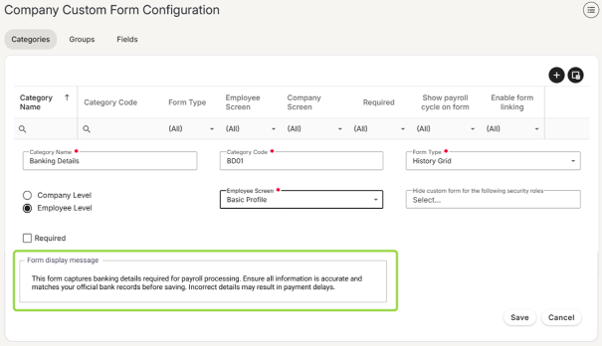
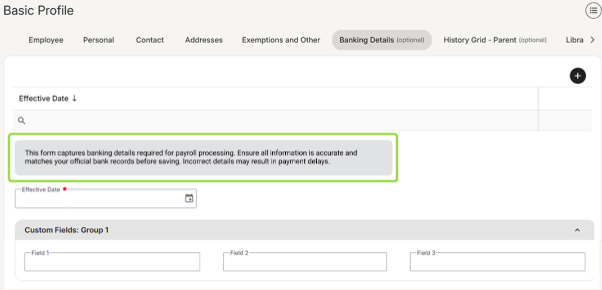
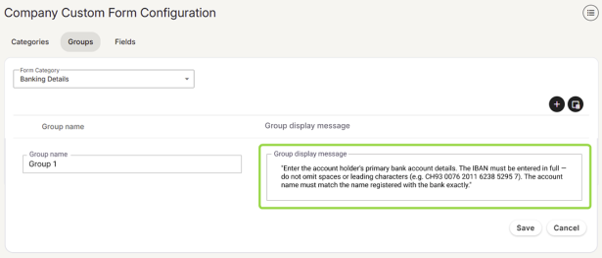
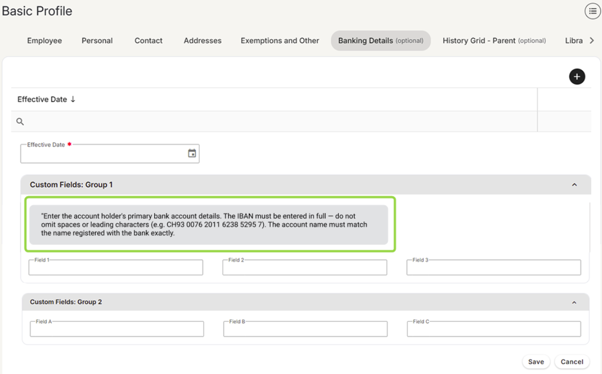
Guide your team through custom forms with precision. You can now add informational alert messages directly to forms or specific groups, ensuring context appears exactly where your team needs it. These helpful prompts can appear on the employee screen, the employee portal, or both, making form completion clearer and more intuitive than ever before.
Form display message — Categories tab
Group display message — Groups tab
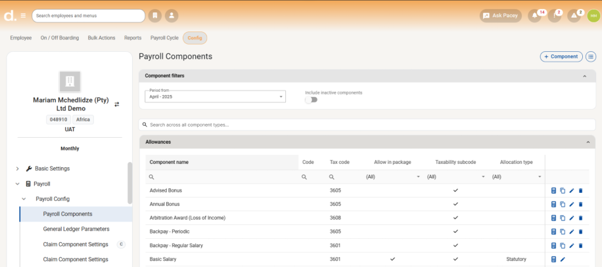
Find any payroll component in seconds
Say goodbye to tab-hopping. We've added a global search bar to the Payroll Components screen, so you can instantly find any component across all tabs with a single search. Whether you're managing a handful of components or hundreds, this upgrade saves time and puts the information you need right at your fingertips.
See all your pay runs at a glance — Group Pay Run View
The new Group Pay Run View consolidates payroll across all your companies and frequencies into a single screen. No more switching between views to track progress. You'll see every pay run at once, and close them in bulk when you're ready. For groups managing payroll at scale, this saves substantial time every cycle.
Keep an eye out on the release notes and next month’s newsflash to see this in action.
AI Assist — Web search for payroll and HR guidance
AI Assist will soon be enhanced with live web search capabilities, giving users instant access to current payroll, HR, and compliance information without leaving the chat. Whether an employee has a payslip question or an administrator needs to verify compliance rules, AI Assist will be able to retrieve up-to-date guidance from across the internet, making payroll faster and easier for your entire organisation.
What this will mean for you:
- Employees: Ask about payslip deductions, leave entitlements, tax implications, and more in plain language. Get context-rich explanations instantly, no more waiting for HR or searching through support articles.
- Administrators: Understand tax calculations, and resolve employee questions quickly. Reduce manual research time and improve confidence in your payroll decisions.
Real-world example:
South African payroll manager: Ask AI Assist: What are the latest tax rates for South Africa and AI Assist will retrieve current SARS tax bands, thresholds, and rebates in real time. No more chasing outdated spreadsheets or manually checking government websites.
AI Assist, soon in your pocket
AI Assist is going mobile. We're optimising the AI Assist experience for mobile devices, so employees can enjoy a seamless, beautifully formatted chat experience no matter where they are or what device they're using. On top of that, employees using Pacey on WhatsApp will soon find AI Assist available directly as a menu option, making it even easier to get instant, intelligent support right from their favourite messaging app.
Pacey AI is now AI Assist
You'll notice 'Pacey AI' is now 'AI Assist' in your navigation bar. Same powerful payroll and HR guidance, clearer name, because it's the intelligent assistant you turn to for instant answers, not a chatbot.
Nothing changes in terms of how you access or use it. Simply look for the AI Assist icon in your navigation bar to get started.
Additionally, we want to highlight that AI Assist is a distinct feature from Pacey, our existing WhatsApp-based ESS module. Both are separate products that serve different purposes:
- Pacey (WhatsApp ESS)
What it is: WhatsApp based ESS module > Who it's for: Employees via WhatsApp > Cost: Paid add-on
- AI Assist
What it is: In system AI chat assistance > Who it's for: Admins, payroll professionals and employees > Cost: Included at no additional cost
Reminder: Have you activated AI Assist?
If you haven't yet activated AI Assist, you can do so by following these simple steps:
- Navigate to Config > Basic Company Information
- Select the General tab
- Check the box: "Enable AI Assist and accept the Terms and Conditions"
- Save your changes
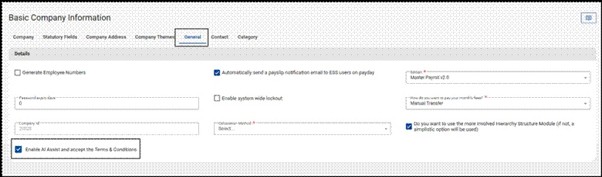
Once activated, all users, including Business Partner, Company-Level, and ESS users, will have immediate access to AI Assist via the navigation bar. If you need to restrict access for specific users, this can be managed through their assigned security role.
✅ Available on all payroll editions
✅ No additional licensing or cost required
What can AI Assist do for you?
AI Assist is available with three features:
Query my Payroll Component Setup
Ever found yourself spending hours cross-referencing payroll components, only to end up with more questions than answers? AI Assist cuts through the complexity. Type your question the same way you'd ask a colleague, and get a straight answer, no reports to run, no screens to dig through.
Best for: Payroll managers, administrators, business partners.
Try asking things like:
- "What is the formula used for the night shift allowance?"
- "Which components are set to calculate on a pro-rata basis?"
Talk to me about my Payslip
How much time does your team spend fielding the same payslip questions from employees every month? AI Assist handles those conversations for you. Employees get immediate, jargon-free answers to their payslip queries without needing to contact HR or payroll, freeing your team up for the work that actually needs their expertise.
Best for: Employees, payroll managers and administrators.
Try asking things like:
- "Can you explain the difference between my tax this month and last month?"
- "What is the SDL contribution on my payslip and who pays it?"
Knowledge Base Search
Get instant access to support content and system guidance without ever leaving the chat. Open AI Assist, select "Get intelligent answers from our knowledge base", and AI Assist retrieves relevant articles in real time, with full follow-up question support.
Try asking things like:
- "How do I set up a new position?"
- "Where do I configure a new medical aid scheme?"
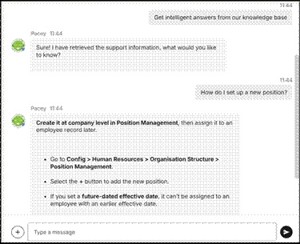
⚠️ Please note: The Knowledge Base Search feature is not available to ESS users.
Your feedback is essential
AI Assist is a product we're continuously evolving, and your input is what shapes it. If you've used the feature, please take a moment to rate AI Assist's responses, every thumbs up or thumbs down helps us improve accuracy and relevance for your team.
We'd love to know what's working well, what could be better, and what you'd love to see AI Assist do next.
Please send feedback to product@payspace.com
Support newsletter
Stay ahead of payroll changes. Our support team shares tips, best practices, and updates so you can confidently manage payroll in any market. Read now →
Training dates — 2026
| Course | Format | July dates | August dates | September dates |
|---|---|---|---|---|
| Payroll Administration Training | Half day | 01 | 03 | 01 |
| Payroll Essentials Training | Full day | 06152127 | 0411172631 | 0207152129 |
| HR Essentials Training | Full day | 03 | 05 | 02 |
| Advanced Features Training | 2 full days | 07 & 0816 & 1722 & 2328 & 29 | 06 & 0712 & 1318 & 1927 & 28 | 03 & 0409 & 1016 & 1722 & 2329 & 30 |
| RSA Payroll Tax Fundamentals Training | Full day | 06 | 07 | 04 |
| Payroll Tax Submission eLearning | Half day | eLearning | eLearning | eLearning |
| Employment Tax Incentive Training | 2 Half days | On request | On request | On request |
| Employment Equity Training | Half day | eLearning | eLearning | eLearning |
| Training Skills and Incident Management | Half day | 10 | 14 | 11 |
| Building a Demo Company Training - Business Partners | Full day | 02 | 04 | 04 |
| Java - Script and Income Training | 1.5 Days | On request | On request | On request |
| Seminars | ||||
| Payroll Tax Seminar | Half day | 28 | TBC | TBC |
| HR Seminar | Half day | TBC | TBC | TBC |
| Webinars | ||||
| Lunch and Learn | 1 hour | 14 | TBC | TBC |
All sessions are virtual. View the full training page →