
Product Monthly Newsletter · Preview
Future-Dated Terminations - Loans and Leave Encashment Settlement Processing
Previously, when terminating an employee with a future termination date, payroll component settlement for active loan repayments and encashed leave were automatically posted to the current active company run instead of the employee's designated termination run. Correcting these settlement postings required manual reconciliation and re-posting of components.
With our latest enhancement to the Tax Profile screen, leave encashment and active loans for employees with future-dated terminations are automatically processed within their designated termination run.
What this will mean for you:
- Less time spent on manual reconciliation and re-posting of settlement components
- Improved accuracy in settlement — Leave encashment and Loan components post to the correct payroll run automatically
- Faster termination processing workflows with fewer manual steps
- Stronger audit trail and compliance for settlement post
Leave Types - Control How Days Are Counted Per Leave Type
Annual leave is typically deducted in working days, while maternity leave often needs calendar day counting. Previously, you had to choose one approach for all leave types per employee, with no way to treat different leaves differently.
Now you will be able to configure each leave type independently. A new "Days to use during leave application" setting on every leave type gives you three options:
Use company level setting (default) - Follows your standard working/calendar day pattern. No existing data changes required.
Working days - This leave type always counts working days, regardless of company settings.
**Calendar days **- This leave type always counts consecutive calendar days.
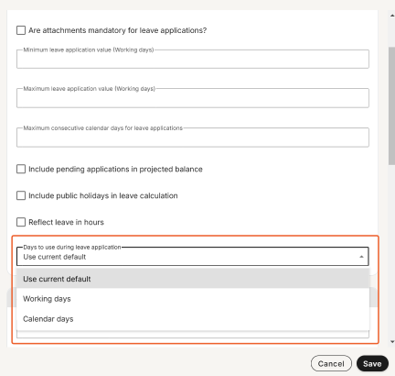
Why it matters: Manage your entire leave policy in one place without manual workarounds. Annual leave can follow working day patterns while other leave like maternity benefit can follow calendar day accuracy, all automatic per employee per leave type.
Lite Edition — Ability to configure Bank Names
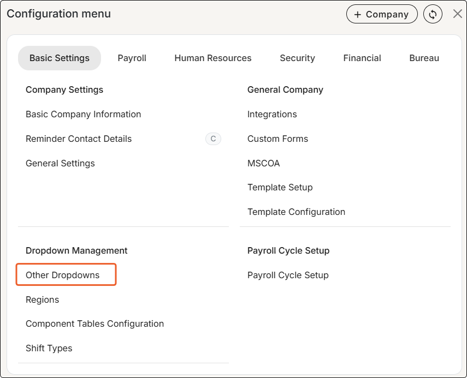
The Other Dropdowns screen (used to configure Bank Names) was previously restricted to Premier and Master edition customers, requiring Lite edition customers to contact Support for any additions or updates. Lite customers can now configure bank names directly on the Other Dropdowns screen.
This update empowers users to manage their own bank name configurations removing the need to escalate requests to Support.
ESS & MSS Security - Hide the search bar with one permission setting
Administrators can now limit search bar access in multi-tenant Employer of Record (EOR) setups where independent employees are organised under a single company entity—to safeguard worker privacy and block unauthorised cross-organisational access to employee details.
How it works:
- Employee and Menu Search Bar Permission: Administrators can toggle this setting to either Allow or Deny across ESS and MSS security roles.

- Visibility Control for ESS and MSS: Selecting Deny completely removes the search bar from the employee view.
Pacey - Arabic Language
Employees will soon be able to seamlessly update their language preferences on WhatsApp ESS to Arabic by selecting "Change Language" either from the Main Menu or on the initial security prompt.
Stay tuned to upcoming release notes and next month’s newsflash for its official launch.
Bulk Upload - Process Training, Skills and Qualifications Across The Entire Company
Currently, users performing bulk uploads for Employee Qualifications, Skills and Training must run uploads separately for each pay frequency. For organisations with large workforces spanning several pay frequencies, this process demands building distinct templates and processing multiple bulk uploads to cover each frequency individually.
We’re modifying the Bulk Upload validation logic to permit multiple employee frequency groups on a single bulk upload sheet for Qualifications, Skills and Training Records - reducing setup time and improving efficiency.
Screen Conversion - Inbox Management
As part of our ongoing screen modernisation initiatives, we are introducing the updated Inbox Management interface. The Inbox Management (Re-Assign Inbox Entry) functionality serves as an administrative module enabling authorised personnel to handle pending workflow messages assigned to specific employees.
Crafted around user feedback and modern user experience principles, this updated screen simplifies and accelerates the processing of employee workflow items, including leave requests and expense claims. Upcoming enhancements will introduce bulk reassignment capabilities, the option to export individual employee inbox records and integration support via an Inbox Management API.
AI Assist
Transform your payroll management experience with AI Assist, an intelligent conversational tool designed to help administrators, payroll teams, and employees effortlessly resolve complex payroll queries using natural language.
What it is: In-system AI chat assistance
Who it's for: Administrators, payroll professionals, and employees
Cost: Included at no additional charge, delivering extra value and convenience to your organisation.
Activation Steps
If you have not enabled AI Assist yet, follow these quick steps to get started:
- Go to Config > Basic Company Information > General tab.
- Select the checkbox for "Enable AI Assist and accept the Terms and Conditions".
- Save your updates.
Following activation, all user roles (including Business Partner, Company-Level, and ESS) can access AI Assist directly from the main navigation bar. User access can also be managed or restricted via security role settings if necessary.
Key Capabilities
AI Assist offers three primary features to streamline your operations:
1. Query my Payroll Component Setup
Eliminate the manual effort of cross-referencing payroll components and searching through screens or reports. Ask your questions naturally to receive clear, direct answers immediately.
Ideal for: Payroll managers, administrators, and business partners.
Sample queries:
- "What is the formula used for the night shift allowance?"
- "Which components are set to calculate on a pro-rata basis?"
2. Talk to me about my Payslip
Reduce the time spent handling routine employee payslip inquiries. AI Assist provides workers with instant, easy-to-understand explanations of their payslips without requiring HR or payroll intervention.
Ideal for: Employees, payroll managers, and administrators.
Sample queries:
- "Can you explain the difference between my tax this month and last month?"
- "What is the SDL contribution on my payslip and who pays it?"
3. Knowledge Base Search
Find instant support and documentation directly within the chat interface. Simply select "Get intelligent answers from our knowledge base" in AI Assist to pull up relevant guides in real time, complete with follow-up assistance.
Sample queries:
- "How do I set up a new position?"
- Where do I configure a new medical aid scheme?"
Share Your Feedback
We are committed to continuously improving AI Assist based on your user experience. Please take a moment to rate responses with a thumbs up or thumbs down to help refine accuracy and quality.
We welcome your insights on what works well, areas for enhancement and features you would like to see next.
Please share your suggestions to product@payspace.com.
September Product Webinar
We hosted a virtual product webinar in September offering an exclusive first look at future enhancements and new product features.
If you missed it, catch the recap on YouTube →
Support newsletter
Stay ahead of payroll changes. Our support team shares tips, best practices, and updates so you can confidently manage payroll in any market. Read now →
Training dates - 2026
| Course | Format | October dates | November dates | December dates |
|---|---|---|---|---|
| Payroll Administration Training | Half day | 01 | 02 | TBC |
| Payroll Essentials Training | Full day | 0205131926 | 0309172330 | TBC |
| HR Essentials Training | Full day | 08 | 05 | TBC |
| Advanced Features Training | 2 full days | 06 & 0714 & 1520 & 2128 & 29 | 05 & 0610 & 1118 & 1924 & 25 | TBC |
| RSA Payroll Tax Fundamentals Training | Full day | 04 | 08 | TBC |
| Payroll Tax Submission eLearning | Half day | eLearning | eLearning | eLearning |
| Employment Tax Incentive Training | 2 Half days | On request | On request | On request |
| Employment Equity Training | Half day | eLearning | eLearning | eLearning |
| Training Skills and Incident Management | Half day | 09 | 06 | TBC |
| Building a Demo Company Training - Business Partners | Full day | 08 | 12 | TBC |
| Java - Script and Income Training | 1.5 Days | On request | On request | On request |
| Seminars | ||||
| Payroll Tax Seminar | Half day | TBC | TBC | TBC |
| Annual Labour Seminar | Half day | TBC | 26 | TBC |
| Webinars | ||||
| Lunch and Learn | 1 hour | 13 | TBC | TBC |
All sessions are virtual. View the full training page →