
Product Monthly Newsletter · Preview
Payslip Visibility Control
Payroll teams face a timing constraint: close payroll early to streamline operations, but doing so immediately exposes payslips to employees, ahead of the intended pay date, or manually tick and untick the setting to hide payslips in a closed state each month. This forces a trade-off between operational efficiency and employee communication control. No way to separate payroll closure timing from payslip visibility without manual intervention. Approving and closing payroll automatically unlocks employee access to their payslips, with no automated option to delay visibility until the actual pay date.
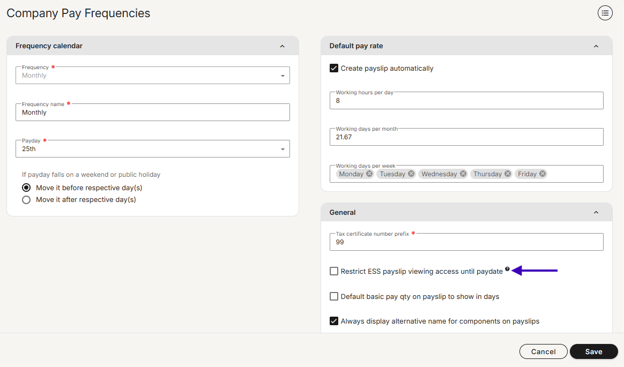
A new Payslip Visibility setting has been added to the frequency setup screen “restrict ESS payslip viewing access until paydate”
- Frequency-level check box - Set once per frequency; applies to all future runs
- Deferred visibility - Payroll can be closed at any time; employee access unlocks automatically on the PayDate
- Recurring by default - The setting persists across all subsequent runs under the same frequency
- Applies to ESS via the website and Pacey
Leave Calendar Visibility
Leave calendars now offer a third visibility option. You could already restrict viewing to your reporting hierarchy (manager/self/direct reports) or your full organization. Now add: restrict to employees in your organizational unit only. Perfect for departments that only need to see their own department/business unit’s leave, or for EOR partners running multiple companies as separate org units.
Who benefits: Multi-entity organizations, EOR partners, and departments where leave visibility maps to org structure, not just management hierarchy.

Leave Application - Add to Calendar
When leave requests move between approval stages, your managers and employees need to stay coordinated. Adding ICS calendar attachments to leave approval notifications puts the relevant dates directly into their calendar application.
What you get:
- Calendar-attached notifications - Leave approval notifications now include an ICS calendar file, so recipients can instantly add key dates (leave start/end) to their calendar without manual data entry.
- Sync-friendly - Works seamlessly with Outlook, Google Calendar, Apple Calendar, and other standards-compliant calendar applications.
- Fewer missed deadlines - Managers see leave approval windows and employee absence dates in their calendar workflow, reducing coordination friction.
Fewer missed approvals, better visibility, and less back-and-forth.
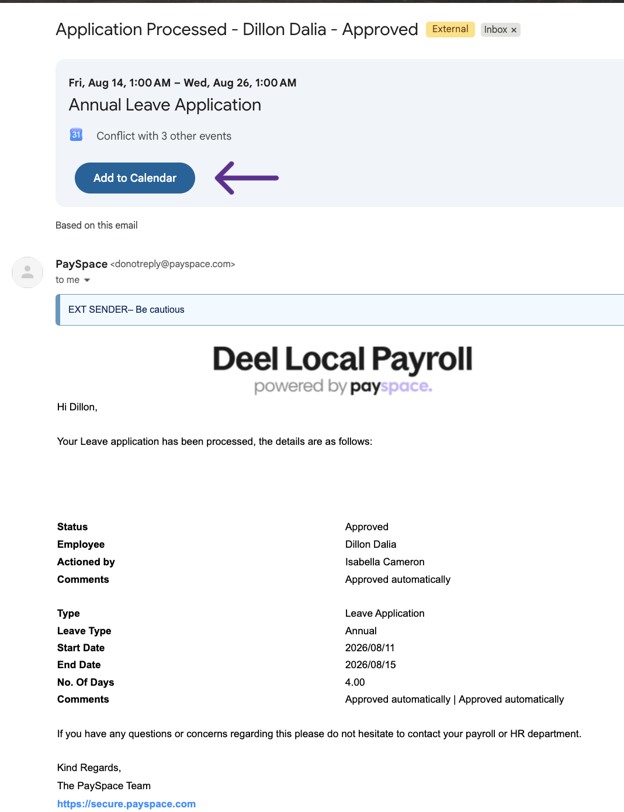
*Note that each email provider may have a different way of displaying the calendar attachment
Component - Level Editing Restrictions
Enforce data integrity at the source.
Security roles are getting granular. You'll soon control not just which screens users see, but which components they're allowed to edit. Say you have users dedicated to managing variable income, restrict them to only those components. Or if overtime flows from your time & attendance system as the source of truth, lock users out of editing it directly in payroll. Set rules once. The system enforces them across payslip edits, recurring screen, bulk uploads, and API calls with validation errors on save. Users can still see component values on any screen they have access to, they just can't input them. Moves you from training-based controls and month-end audits to system-enforced accuracy.
Why it matters: Less manual verification. Fewer month-end surprises. Data stays clean because users can't accidentally (or intentionally) modify it.
Leave Types - Control How Days Are Counted Per Leave Type
Annual leave is typically deducted in working days, while maternity leave often needs calendar day counting. Previously, you had to choose one approach for all leave types per employee, with no way to treat different leaves differently.
Now you will be able to configure each leave type independently. A new "Days to use during leave application" setting on every leave type gives you three options:
- Use company level setting (default) - Follows your standard working/calendar day pattern. No existing data changes required.
- Working days - This leave type always counts working days, regardless of company settings.
- Calendar days - This leave type always counts consecutive calendar days.
Why it matters: Manage your entire leave policy in one place without manual workarounds. Annual leave can follow working day patterns while other leave like maternity benefit can follow calendar day accuracy, all automatic per employee per leave type.
Recurring Cut-Off Date Settings
Cut-off dates are currently managed at individual run level, creating inconsistent timing rules across open runs and requiring manual input. By implementing a frequency-level setting that accepts 'X days before paydate,' users can establish consistent cut-off windows for all related runs with a single configuration, eliminating manual per-run management and ensuring standardized timing across the business per frequency.
Why It Matters
- Operational efficiency - Eliminates manual intervention and allows consistent cut off timing allowing users to start moving at their natural pace.
- Scalability - As global teams grow and add new pay structures, they can configure them without rewriting processes.
- Compliance confidence - Consistent, documented cut-off dates for each frequency make audit trails cleaner and compliance simpler.
AI Assist Knowledge Base
Did you know you can get immediate, on-demand support right inside your DLP platform?
If you haven't tried AI Assist, you're missing out on a faster way to resolve your daily payroll queries. Powered by our comprehensive knowledge base, AI Assist is designed to give you accurate answers instantly, without the need to log a support ticket or wait for an email reply.
How to get the best results:
AI Assist thrives on context. The more detail you include in your prompt, the better and more accurate your response will be.
We want your feedback
AI Assist is constantly learning, and your input is its best teacher. After receiving an answer, please use the 👍or 👎rating to let us know if it hit the mark, and drop a quick comment on the feedback given. Your insights are essential in helping us refine the tool and improve the support experience for everyone.
Try AI Assist now and simplify your support experience.
Product User Group Sessions - September 2026
We're hosting the 2026 Product User groups sessions this month, an opportunity to contribute insights and engage with our product experts. The on-site sessions planned for Johannesburg and Cape Town are fully booked, but there are still spaces available for the Product Webinar.
Product Webinar: If you weren't able to secure a spot at the on-site sessions, join us for an in-depth view of the latest and upcoming features. This session is only for Direct Customers.
Friday, 18 September 9:00-10:00
Support newsletter
Stay ahead of payroll changes. Our support team shares tips, best practices, and updates so you can confidently manage payroll in any market. Read now →
Training dates - 2026
| Course | Format | September dates | October dates | November dates |
|---|---|---|---|---|
| Payroll Administration Training | Half day | 01 | 01 | 02 |
| Payroll Essentials Training | Full day | 0207152128 | 0205131926 | 0309172330 |
| HR Essentials Training | Full day | 02 | 08 | 05 |
| Advanced Features Training | 2 full days | 03 & 0409 & 1016 & 1722 & 2329 & 30 | 06 & 0714 & 1520 & 2128 & 29 | 05 & 0610 & 1118 & 1924 & 25 |
| RSA Payroll Tax Fundamentals Training | Full day | 07 | 04 | 08 |
| Payroll Tax Submission eLearning | Half day | eLearning | eLearning | eLearning |
| Employment Tax Incentive Training | 2 Half days | On request | On request | On request |
| Employment Equity Training | Half day | eLearning | eLearning | eLearning |
| Training Skills and Incident Management | Half day | 11 | 09 | 06 |
| Building a Demo Company Training - Business Partners | Full day | 18 | 08 | 12 |
| Java - Script and Income Training | 1.5 Days | On request | On request | On request |
| Seminars | ||||
| Payroll Tax Seminar | Half day | 15 | TBC | TBC |
| HR Seminar | Half day | TBC | TBC | TBC |
| Webinars | ||||
| Lunch and Learn | 1 hour | 03 | TBC | TBC |
All sessions are virtual. View the full training page →