
Support Talk Newsletter · Preview
SARS Strengthens Enforcement of Employment Tax Incentive Claims
The South African Revenue Service (SARS) has issued Interpretation Note 145 (effective 27 July 2026) and Issue 5 of the ETI Guide to clarify the definition of an "employee" for ETI purposes.
SARS has also published Issue 5 of the Guide to the Employment Tax Incentive (27 July 2026), providing expanded commentary on the "employee" definition in line with Interpretation Note 145.
SARS Interim PAYE Employer Reconciliation (EMP501) Submission Dates
The submission window for the 2026/2027 interim EMP501 reconciliation runs from 21 September 2026 to 31 October 2026.
- SARS will release updated e@syFile software before the submission period opens, reflecting new PAYE BRS updates for 2026/2027.
- Employers should monitor the official SARS PAYE page for release updates and submission guidance.
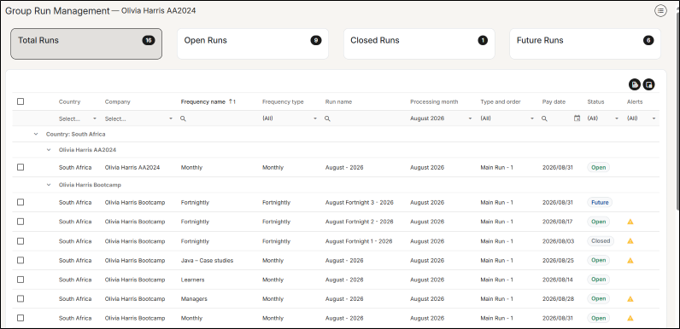
Group Run Management
A new centralised view lets users managing multiple companies and frequencies monitor and update pay run statuses from a single location instead of navigating into each frequency/company separately.
Navigation: Payroll Cycle > Group Run Management
Auto-Create Payslip Without Basic Pay Calculation
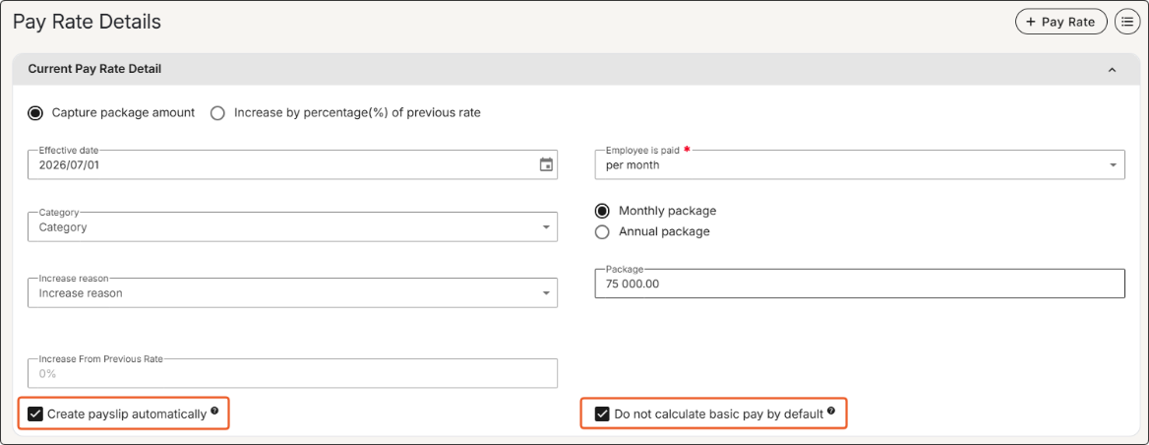
To support scenarios where employees receive alternative payments in place of basic pay:
- The setting "Pay package automatically" has been renamed to "Create payslip automatically" (core functionality remains unchanged).
- A new option, "Do not calculate basic pay by default", allows auto-creation of payslips each run while omitting automatic Basic Pay calculations.
Navigation: Employee > Payroll Processing > Pay Rate Details
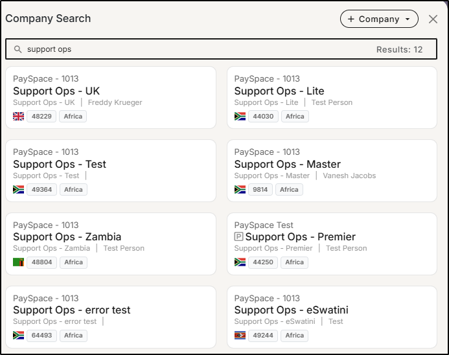
Inline Country Flags for Companies
Country flags now display in line with the company tax authority in Company Search results, allowing for easy reference for customers managing multiple company payrolls.
Employee Photo in Dynamic Form Builder
The Employee Photo field is now available in the Dynamic Form Builder for both Add New Employee and E-Onboarding modules. Once added to a form template, employees can upload their photos directly within the form.
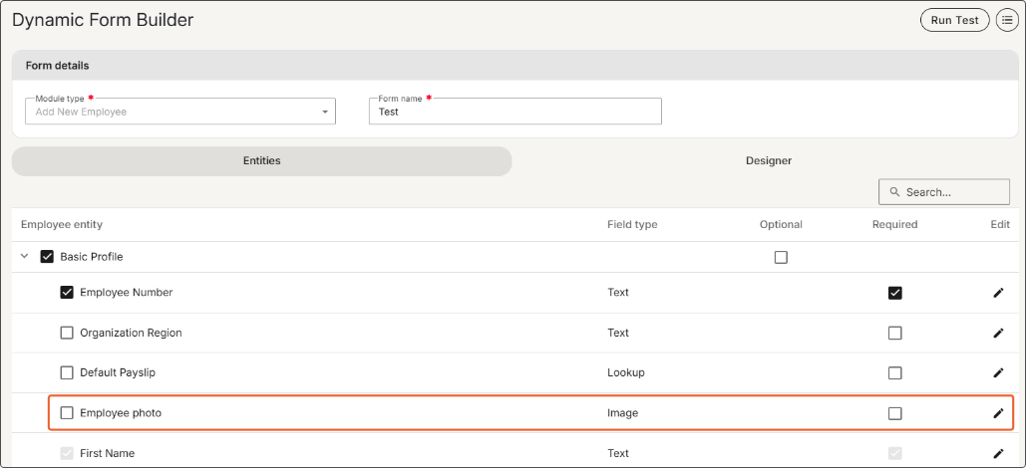
The Dynamic Form Builder is only available on Premier and Master edition.
Payroll Components | Income Base Formula | Employee Dependant Custom Fields
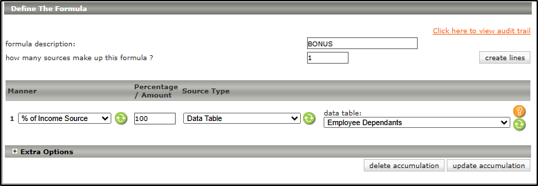
You can now reference custom fields configured on the Employee Dependants screen when building income base formulas on the Payroll Components screen.
Pacey Permissions
Employee features on Pacey depend on your company's ESS security role permissions and your payroll edition.
Note that the Lite payroll edition does not include access to claims.
Frequently asked questions
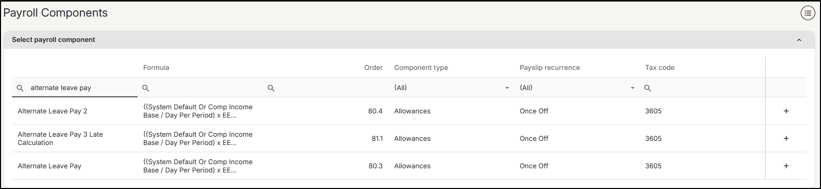
Question: How do I setup Leave Pay to calculate based on a different Income Base rather than the Package amount?
Answer: The Alternate Leave Pay component can be used to calculate based on a different Income Base, rather than the default option mentioned above.
Navigate > Config > Payroll > Payroll Config > Payroll Components
Question: What are the important reports to generate for Bi-Annual Submissions?
Answer:
- EMP201 and EMP501
- ETI Imbalances: Generate the EMP501 ETI Breakdown report and ETI Take On report.
- Tax, UIF, & SDL Imbalances: Generate the Component Variance report and Payroll Reconciliation report.
- Employee Biographical Info: Generate the Dynamic Employee Details and New Engagements and Terminations reports
Question: How do I process corrections for Bi-Annual submissions?
Answer: Create an interim (correction) run linked to August 2026 via Payroll Cycle > Run Management > click + Icon. Complete the required fields and select 'Update'. If the system prevents creation, please log a request with support@payspace.com.
Question: Why do I receive the following GL error: GL will not balance a payroll component has not been allocated a GL String when trying to upload the general ledger?
Answer: The above error is produced by the system if any Allowance/Deduction/Company Contribution components has a payslip value that has not been mapped to a GL account number on the General Ledger Parameters screen.
Please visit AI Assist if you require more information on the above.
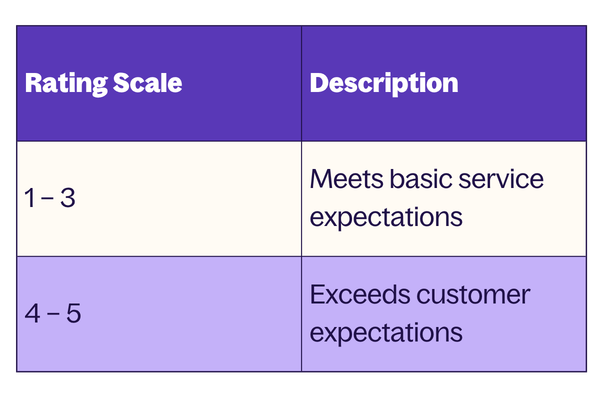
Customer Satisfaction Rating – Post-Support Survey
Help us continuously improve by rating your support experience within 5 days of ticket resolution.
Ratings reflect your individual support consultant's performance based on Responsiveness, Attention to Detail, Quality of Feedback, and Professionalism.
Thank you for taking the time to stay updated with our latest compliance guidelines and product enhancements. As always, our support team is here to assist you, feel free to log a ticket via the system or reach out to us directly via email/phone if you have any questions or need further guidance.