Support Talk Newsletter · Preview
SARS EMP501 Submission Deadline
The interim EMP501 submission period opened on 21 September 2026, with e@syFile v8.0.2 available for submissions due by 31 October 2026.
e@syFile v8.0.2 Release (Effective 21 September)
Key updates include:
- PAYE Dashboard now links directly to the Technical FAQ
- New ITReg indicator in Employee Admin for expanded data capture
- Reconciliation page has a new button to log 'Pending Submission' queries straight from the app
- Reconciliation Status Dashboard can now generate EMP601 reports
- System Info tab added to Utilities menu
- Full update requires uninstall and reinstall
Next Steps:
- Download and reinstall e@syFile v8.0.2 before your submission window opens
- Review the Technical FAQ (linked in your PAYE Dashboard)
- Monitor the SARS PAYE page for any interim submission guidance
Medical Aid Rates 2027
We’re in the process of updating the 2027 Medical Aid tables.
Stay updated by checking the Release Note titled “2027 Medical Aid Update” for the latest additions to the Medical Aid tables.
If you receive any 2027 Medical Aid Rates directly from providers, please reach out to us with the tables so we can ensure they are included.
Support Tickets
Once a Support query is resolved and further assistance is required on a new query, kindly log a new ticket and avoid opening the existing query. This helps our support team:
- Track issues more efficiently
- Provide better categorization and prioritization
- Maintain clear documentation for each query
Company Pay Frequencies - Recurring Cut-Off Dates
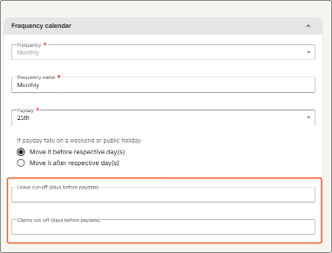
A new configuration option has been introduced on the Pay Frequencies screen to set recurring cut-off dates for Leave and Claims. This allows administrators to establish consistent, frequency-wide cut-off windows that automatically populate on all future runs within a given frequency, eliminating the need for manual per-run configuration.
Run Management - Improved Run Deletion and Ordering
Run deletion and ordering have been improved to eliminate gaps in run numbering and provide clear confirmation of the changes. When a run is deleted, the run order of all subsequent runs in the same processing period are automatically decreased by one.
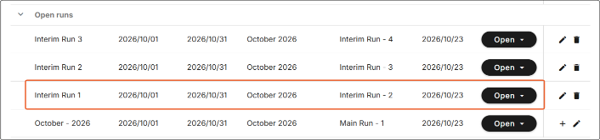
For example, if a processing period has runs with order numbers 1, 2, 3, and 4, and run order 1 is deleted, the remaining runs are automatically renumbered to 1, 2 and 3. This eliminates gaps in the numbering sequence while preserving the relative processing order of all runs.

Custom Report Writer - Simplified Report Creation Workflow
The Custom Report Writer has been updated to streamline the report creation workflow and offer greater flexibility. This change represents the beginning of a larger transformation toward a stateless report’s architecture, which will eventually support uploading custom data such as Excel files directly into reports, enabling the creation of static documents like Bonus letters.
Navigation: Reports > Reports > NextGen Reports

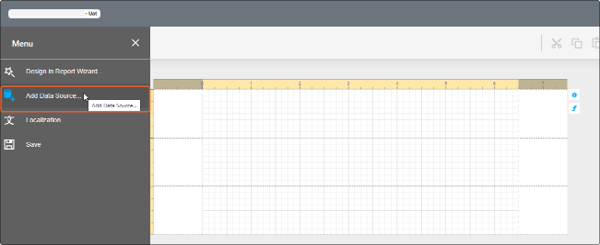
Reports can now be created and saved without requiring an immediate data source, providing the foundation for future support of static documents such as letters and certificates.
For more information on the above, refer to our release notes.
Time & Attendance Integration with Payroll
Time & Attendance provides direct integration with biometric systems, automatically mapping attendance data directly into payroll calculations to eliminate manual data entry errors.
Access the following link for more information on our integration partners.
Frequently asked questions
Question: How do I generate a consolidated CSV Tax File for a company with multiple frequencies?
Answer: The system allows companies with multiple frequencies and the same tax number to generate a consolidated tax file to import into e@syFile Employer, rather than extracting individual CSV files per frequency.
Enable the applicable company setting with these steps:
Navigate > Config > Basic Settings > Company Settings > General Settings > Statutory Settings

Question: Can employees download their tax certificates from Pacey?
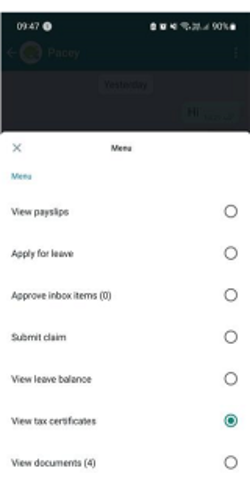
Answer: Yes. One of the menu options available to employees when interacting with Pacey is "View tax certificates".